Slash Commands
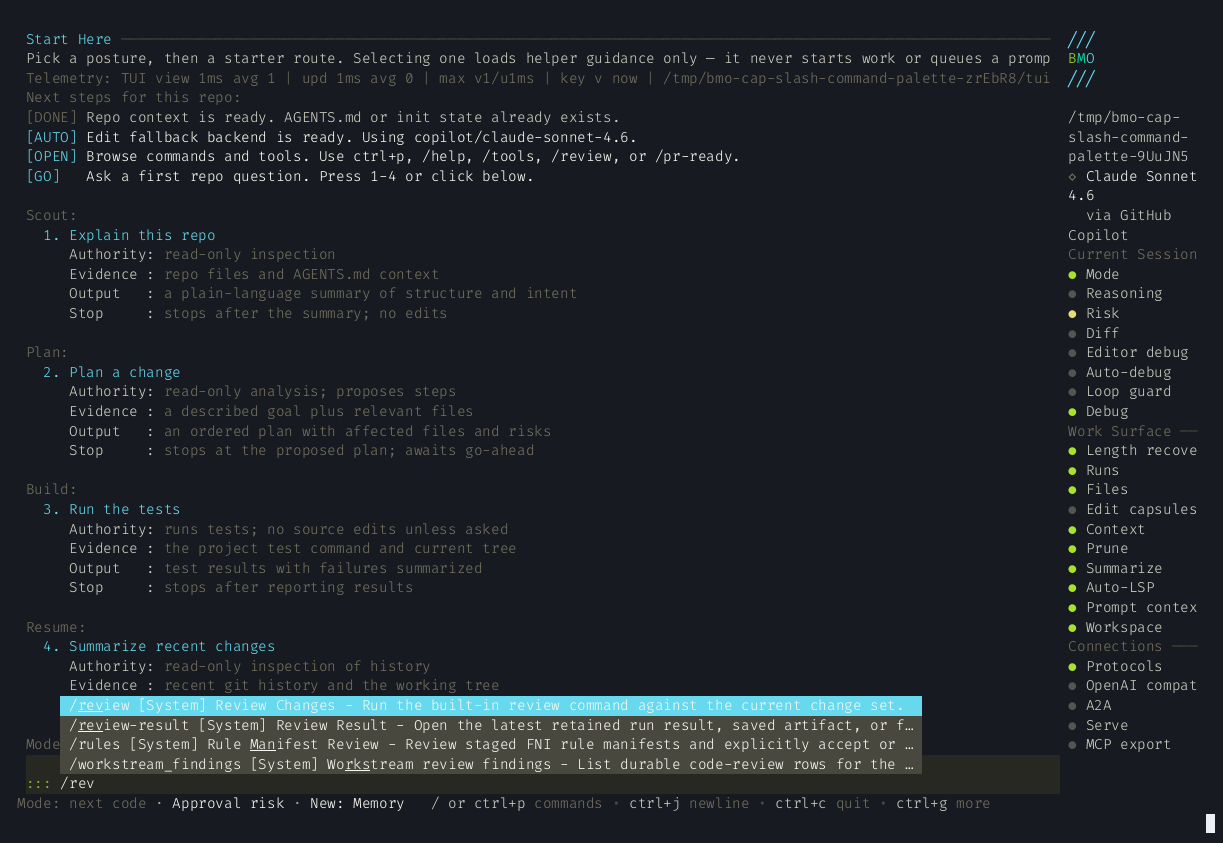
Type / in the TUI to trigger a slash command. Partial matches are supported —
/se matches /session. If you prefer the keyboard, ctrl+p opens the same
command picker. See Keyboard Shortcuts for the
rest of the TUI controls.
Session management
Section titled “Session management”| Command | Aliases | Description |
|---|---|---|
/new | /new-session | Start a new session |
/session | /sessions | Switch between sessions |
/summarize | /summary | Summarize and compact the current context |
Model & mode
Section titled “Model & mode”| Command | Aliases | Description |
|---|---|---|
/model | /models | Switch model mid-session |
/model-selection | /model_selection | Show the shared model-selection status family: configured slots, next-turn selector, and one-turn override posture |
/mode [mode] | Show or set the shared session-mode status family. Read-only /mode reports current mode, reachable modes, deferred mode-change posture, and the latest bounded autoselect/manual-override fact; setting a mode keeps the existing choreography-backed mutation path. The built-in modal preset exposes code, chat, debug, review, plan, and sre; custom choreographies may expose fewer states. | |
/thinking | Toggle extended reasoning mode | |
/reasoning | Set reasoning effort level |
Content & context
Section titled “Content & context”| Command | Aliases | Description |
|---|---|---|
/attach | /file-picker | Attach a file to the current message |
/editor | Open current prompt in $EDITOR | |
/memory | View and manage persistent memories | |
/reflections | /pending_reflections, /reflection_approve | Review reflections awaiting operator approval; approve to persist or reject to discard (requires the sqlite backend) |
/debugger | /runs | Open the replayable agent debugger for recent runs in the current session |
/slash-status | /slash_status | Show slash discovery posture, exact gateway behavior, and a bounded recent slash-routing tail; pair with bmo config show-slash-status for the detached config-only view |
/run-observability | /run_observability | Open the bounded run-observability hub for session summary, cue ledger, and trace-lens routing |
/cue-ledger | /cue_ledger, /run-cue-ledger, /run_cue_ledger | Open the run cue ledger for the current session family |
/epistemic-control [hints] | /epistemic_control | Inspect BMO’s decision posture for acting, asking, inspecting, or deferring under uncertainty; see Decision Posture |
/rule-files | /rule_files | Show the session-aware local rule-file projection for the current workspace |
/chat-interface | /chat_interface, /shell-posture, /shell_posture | Show the local-only Bubble Tea chat-shell status family: transcript/composer posture, overlay state, and when to drill into /degraded |
Workflow control
Section titled “Workflow control”| Command | Aliases | Description |
|---|---|---|
/intent discuss|plan|execute | Set the next submit intent: discuss (chat/read-only, skips plan-prompt injection), plan, or execute. Optional text on the same line is sent immediately under that intent. Use /intent discuss … to explore a topic without running mutating tools. | |
/approve | /approve-plan, /approve_plan | Approve a staged plan and advance to execute phase |
/contract-rerun | /contract_rerun | Re-run change-contract checks for the active session |
/contract-obligations | /contract, /contract_obligations | Inspect or waive the current session’s change-contract obligations |
/plan | /return-to-plan | Return to plan phase to revise before executing |
/review | Run the built-in review command against the current change set | |
/pr-ready | /pr_ready | Run the built-in PR-ready command to harden the current change set for merge |
/todos | Toggle the task/todo pills overlay; can resurface recent or completed todo state, not only active todos | |
/queue | /queues | Open the queued prompt manager scoped to the current session when one is active |
/enqueue <prompt> | Queue a prompt for execution after the current run completes (same as ctrl+enter from the composer) | |
/diff-mode | /diff_mode | Toggle inline diff display for file writes |
/yolo | Toggle yolo mode (skip all tool confirmations) |
Agents & teams
Section titled “Agents & teams”| Command | Aliases | Description |
|---|---|---|
/agents | /agent | View spawned sub-agents and manage active ones with follow-up or close actions |
/agent-family | /agent_family, /family | Inspect live child sessions and recent replayable family runs in one operator surface |
/agent_kinds | /kinds, /agent-kinds | View configured agent kinds (registry: prompts, mesh caps, tool policy)—not live spawns; see Agent kinds |
/worktree | /worktrees | View and manage sub-agent git worktrees and isolation overrides |
/team | /jobs | View live team and batch job status |
Recipes & skills
Section titled “Recipes & skills”| Command | Aliases | Description |
|---|---|---|
/recipe | /recipes | Open the recipe picker dialog |
/schedules | /scheduled-jobs, /scheduled_jobs | Browse persisted scheduled jobs from the scheduler store |
/schedule | /schedule-daemon | Inspect the schedule daemon and start or stop it |
/skills | Open the skills picker and activate a discovered skill |
UI controls
Section titled “UI controls”| Command | Aliases | Description |
|---|---|---|
/sidebar | Toggle the sidebar | |
/help-toggle | Show or hide the inline keybinding help footer | |
/activity | /toggle-activity | Expand or collapse the runtime Activity row feed (same as ctrl+a; Activity strip is on by default — set options.tui.runtime_activity_row = false to hide) |
Configuration & introspection
Section titled “Configuration & introspection”| Command | Aliases | Description |
|---|---|---|
/hooks | View configured hooks and recent runtime hook activity | |
/settings | /config | Open the settings dialog |
/config-status | /config_status | Show live layered-config status from the shared status snapshot |
/autopilot | Start or stop the headless autopilot runtime | |
/autopilot_status | /autopilot-status, /ap-status, /ap_status | Inspect autopilot posture, pillars, PID files, manifest, and the recent autopilot.fired ring |
/gateway_status | /gateway-status, /slack-gateway-status | Inspect the shared Slack gateway service-status family: DM-only posture, detached authority, store checks, configured health metadata without implicit probing, and truthful recent-event unavailability for detached readers |
/contracts | /goal-contracts, /goal_contracts | Inspect persisted goal contracts: rails, expiry, and kill-switch state; see Goal contracts |
/lifecycle | /dlb-lifecycle | Read-only lifecycle surface: class, state, authority, posture context, and reason metadata |
/endocrine-graph | /composition-graph, /w4-graph | View the config-derived cross-layer composition sketch (nodes, edges, acyclicity) |
/metabolism | /fleet-controller | Inspect fleet controller cycles, recommendations, and health signal state |
/fleet-metabolism | /fleet_metabolism, /metabolism-posture, /metabolism_posture | Print the fleet runtime posture snapshot inline in the chat transcript; see Fleet runtime observability |
/journal-status | /journal_status | Show Journal posture: state, partition binding, recent ring saturation, and action × outcome counts. See Journal posture. |
/health | /health-posture, /health_posture | Show the shared health-check posture family: lifecycle vocabulary, subsystem rows, sticky-holding warnings, and explicit detached-vs-live authority; GET /v1/health remains liveness-only |
/journal | /j | Cross-subsystem dated narrative for the current session |
Discovery, packs, and operator views
Section titled “Discovery, packs, and operator views”| Command | Aliases | Description |
|---|---|---|
/questions | /question | Browse and resolve pending operator questions (permissions, MCP elicitations, clarifications); see Operator questions |
/discovery | /discover, /explore | Browse capabilities grouped by category (same registry as the command palette) |
/arena | Inspect the shared Arena status snapshot, recent candidate/workflow posture, and start a comparison round | |
/gloss | /timeline, /perf | Per-turn execution timeline with phase durations |
/markers | /workspace-markers | Workspace stigmergy markers and scope counts |
/workspace-claims | /claims | Inspect active workspace path claims, hard/soft counts, and negotiation states |
/pack | /packs | Operating pack picker and session pack state |
/capsules | /edit-capsules | Recent edit capsules with recovery classification, rollback, and dismiss flows |
/undo | Recovery hub for session checkpoints, recovery-needed edit capsules, and destructive git commit rewind | |
/orch | /adaptive-orch, /adaptive_orch | Adaptive orchestration inspector (reshape, monitor) |
/compaction | /compaction-reactions, /compaction_reactions | Recent compaction idle-gate evaluations |
/context | Open the Context hub: token budget, pruning controls, and deep-links to memory and compaction | |
/prompt-stack | /prompt_stack | Show the metadata-only prompt-stack posture: process ring, last-build actions, recent builds, and Context Lineage handoff; see Prompt Stack |
/quality-gates | /quality_gates | Show Quality Gates posture: armed surfaces, judge status, and metadata-only recent decisions; see Quality Gates |
/strategy | /workspace-strategy | Inspect cross-session workspace strategy memory entries |
/cartography | /workspace-map, /workspace_map | Open heat, stigmergy markers, and workspace trail in one tabbed drill-in |
/germinate | /germinate-dormant, /germinate_dormant | Record germination (dormant → active) for a persisted promotion seed |
Utility
Section titled “Utility”| Command | Aliases | Description |
|---|---|---|
/init | Analyze the project and write the configured context file (AGENTS.md by default) | |
/docs | /quickstart | Open the quickstart in the browser |
/tools-docs | /reference-tools | Open the tools reference in the browser |
/tools | Open the Commands palette on the Tools tab | |
/help | /commands | Open the Commands palette (use /tools, /capabilities, or /discovery for discovery) |
/capabilities | Show capability summary (what BMO can do) | |
/quit | /exit | Exit BMO |
Behavior visual
Section titled “Behavior visual”Partial / input in the TUI raises the likely command and keeps review and
debugger workflows one keystroke away:
Slash command palette