
Workstreams and Factory Patterns
The factory pattern is BMO’s practical way to make repeated work less ad hoc without pretending the agent is an autonomous system. It turns the multiplayer engineering workspace into a repeatable operating shape: a workstream names the durable unit of work, recipes or prompts define the reusable process, agents and nanites handle bounded lanes, review and verification record evidence, recovery stays visible, and markers/trail preserve signal-shaped coordination for the next turn.
What problem this solves
Section titled “What problem this solves”A single chat can solve one task. A serious project usually needs a repeatable loop:
- preserve the goal and current branch context
- run the same review or verification pattern more than once
- attach findings, plans, artifacts, and follow-up work to one durable row
- let background checks contribute without taking over the foreground session
- recover after interruption without replaying a whole transcript
The factory pattern gives that loop a stable operating shape. In the concept map, workstreams sit in the workflows and decision-forums family; they often consume Stigmergic Delivery signals, but the durable work item remains the workstream row.
The core idea
Section titled “The core idea”Think of a factory as a small production cell for agent work:
| Factory part | BMO surface | Purpose |
|---|---|---|
| Work item | Workstream row | Stable identity for an epic, PR, issue, or follow-up package |
| Process | Recipe, prompt, or staged workflow | Repeatable steps and gates |
| Side lane | Nanite or child agent | Bounded parallel inspection or summarization |
| Memory of friction | Markers and trail | Advisory hints about hotspots, failures, or handoffs |
| Evidence | Artifacts, findings, verification rows | Inspectable output and next actions |
This makes repeated agent behavior inspectable. The operator can ask “what is this workstream, who owns which lane, what has been tried, what failed, what was reviewed, and what should run next?” without relying on hidden model memory.
Use it when
Section titled “Use it when”- A task spans more than one session.
- A review or verification loop should run repeatedly with similar inputs.
- Multiple agents, nanites, or tools contribute to the same outcome.
- You want a durable handoff between planning, implementation, review, and verification.
Do not use it when
Section titled “Do not use it when”- You are asking a throwaway question.
- The work has no follow-up or durable artifact value.
- A simple one-shot
bmo runor interactive chat would be easier to inspect.
Minimal factory shape
Section titled “Minimal factory shape”bmo workstream create --label "docs/doc-assets-visual-coverage"bmo workstream set-plan <id> --path docs/plans/book-visual-coverage.md --kind custombmo workstream verify-run <id> pnpm --dir docs run buildbmo nanite run --session <parent-session-id> "summarize residual docs gaps for this workstream"That sequence creates durable identity, binds a plan, records a verification result, and lets a bounded background run produce a handoff.
How it relates to markers and trail
Section titled “How it relates to markers and trail”Markers and trail are not the factory. They are the shop-floor signs that help later turns understand where attention should go.
- Markers are explicit, bounded notes left by tools or operators: “this path is risky,” “this validation failed,” “inspect here before editing.”
- Trail is aggregate advisory context across sessions: repeated truncation, recurring validation failure, or other scoped signals.
- Workstreams provide the durable named row that these signals can support.
Use markers for intentional handoffs. Use trail for accumulated environmental hints. Use workstreams when the work itself needs an identity.
What you should see
Section titled “What you should see”A healthy factory-shaped workflow has visible state in more than one surface:
| Surface | Signal |
|---|---|
| Status/sidebar | Workstream, observer, schedule, and run-state hints |
/cartography | Heat, markers, and trail tabs for workspace context |
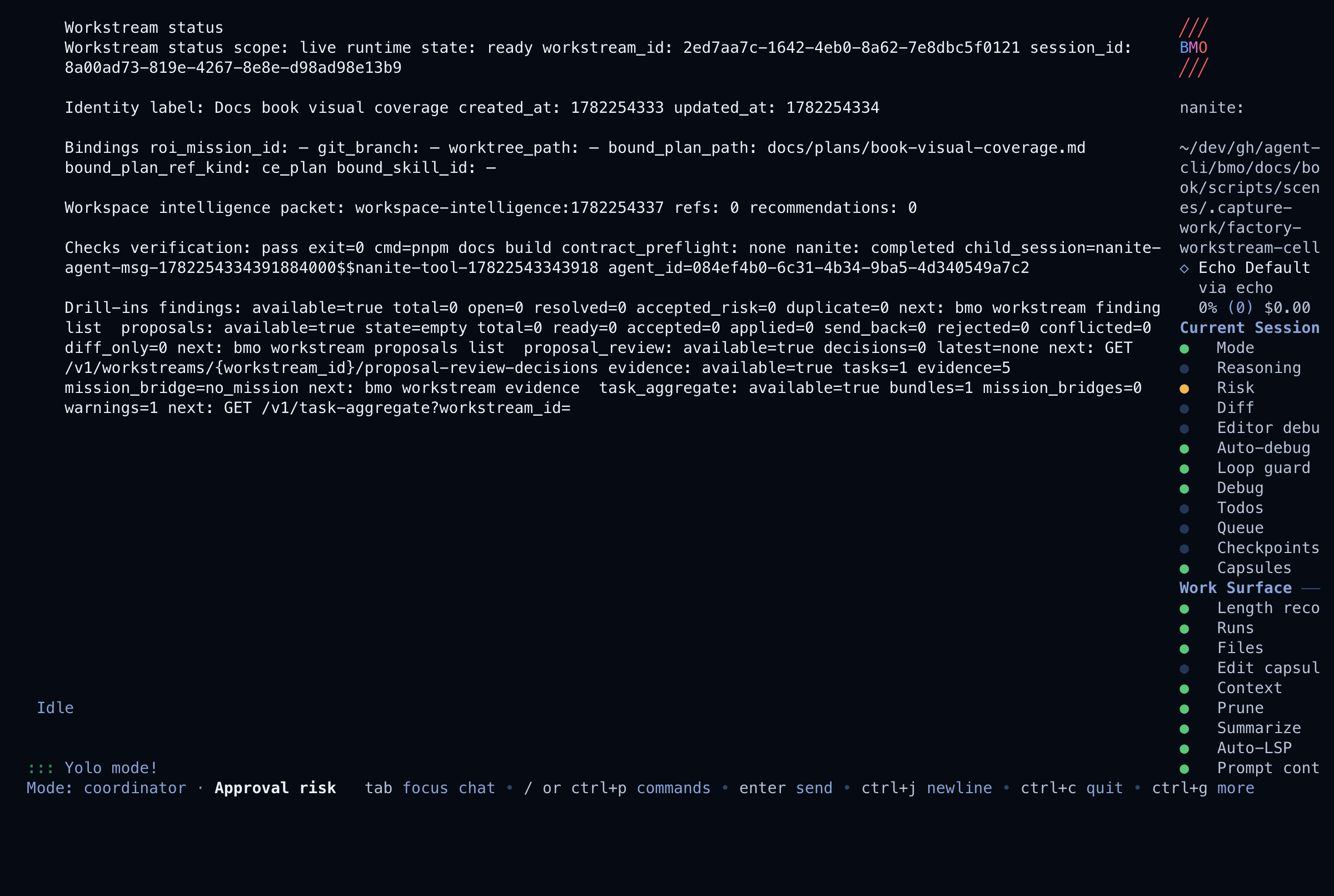
bmo workstream status or /workstream-status | Bounded workstream summary: identity, bindings, verify/preflight/nanite posture, and drill-in availability |
bmo workstream show | Raw durable row fields and attached metadata when you need the underlying record |
| Agent debugger | Parent/child run history and tool events |
| Artifacts/todos | Concrete outputs, not just prose in chat |
Inspectable handoff
Section titled “Inspectable handoff”For a factory-shaped run to stay inspectable after interruption, the operator should be able to review a compact handoff without replaying the whole chat. That handoff usually includes:
- a workstream id and bound plan or recipe;
- a declared collaboration boundary, such as parent-only, child agent, nanite, team, mesh/A2A proposal, full-app shared workspace, or minimal MCP;
- delegated lane results when delegation is used;
- review findings, verification rows, or equivalent artifacts;
- a clear status for completed, partial, blocked, superseded, or unavailable outcomes.