
Multi-Agent & Teams
BMO supports multiple patterns for agent-to-agent coordination, from simple sub-agent spawning to persistent team workflows.
For the bigger coordination map across local sub-agents, remote mesh peers, staged workflows, and regulation layers, see Workflow map and How BMO thinks and acts.
Spawning sub-agents
Section titled “Spawning sub-agents”Use spawn_agent when you need a child agent with its own prompt and optional
tool/model/worktree overrides:
spawn_agent( prompt="Refactor the auth module to use JWT", tools=["view", "edit", "bash"])The child agent runs concurrently. Use wait_agent(ids=[...]) to block until
it finishes, or get_agent_output(id="...") to poll without blocking.
Shared workspace claims
Section titled “Shared workspace claims”In the full app, concurrent agents share BMO’s data directory, session/message
stores, and working tree. BMO coordinates that live tree with workspace_claim
using a three-tier model: T1 session path claims (process-local rows),
T2 shared path mirror (SQLite workspace_path when durable hard claims are
enabled), and T3 resource leases (ports and other runtime_claim surfaces).
Soft claims publish intent; hard claims block overlapping BMO mutation tools
that consult the claim guard; /workspace-claims shows all tiers with labels.
T1 claims are process-local by default. When durable hard claims are explicitly enabled, hard T1 claims also create a T2 mirror so sibling BMO processes sharing the same data directory block overlapping BMO mutation tools. Claims are still not OS-level locks and they do not stop external editors, shell commands, or non-BMO writers from changing files. Use worktree isolation when you need filesystem-level separation.
Sub-agent tool reference
Section titled “Sub-agent tool reference”| Tool | Description |
|---|---|
spawn_agent | Spawn a child agent with a prompt and scoped tool set |
wait_agent | Block until a child agent completes; stream or collect output |
send_input | Inject a follow-up message into a running child agent |
get_agent_output | Read partial or final output without blocking |
close_agent | Terminate a child agent and release its resources |
list_agents | List all active child agents with their status |
Worktree isolation
Section titled “Worktree isolation”Pass worktree: true to give the child agent its own git branch and filesystem copy:
spawn_agent( prompt="Refactor the auth module", worktree=True)The response includes worktree_path and worktree_branch so you can inspect or merge the output. See Worktree Isolation for full details.
Spawn depth and concurrency
Section titled “Spawn depth and concurrency”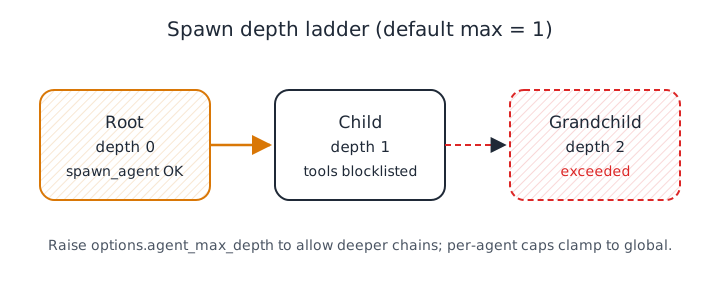
Depth limits nesting; thread limits parallel siblings. Full semantics: maintainer spawning topic (Subagent → Spawn depth caveats).
[options]agent_max_depth = 1    # max depth index (-1 = disabled, 0 = reset to default 1)agent_max_threads = 6  # max concurrent sub-agent goroutines (-1 = unlimited)
[agents.task.delegation]max_depth = 2          # optional; clamped to options.agent_max_depthmax_threads = 4        # optional; tightens global cap
flowchart TB
subgraph chain["Depth chain (default agent_max_depth = 1)"]
R["Root session
depth 0
spawn tools available"]
C["Child session
depth 1
spawn tools blocklisted"]
X["Grandchild
depth 2
spawn depth exceeded"]
end
R -->|"spawn_agent at prepare"| C
C -.->|"would need depth 2"| X
flowchart LR
  subgraph inputs["Config inputs"]
    G["options.agent_max_depth"]
    P["agents.*.delegation.max_depth
(optional)"]
  end
  subgraph resolve["Effective limit"]
    D["Global 0 → default 1"]
    M["min(per-agent, global) when set"]
    E["effectiveMaxDepth"]
  end
  subgraph guard["PrepareChild guard"]
    T["currentDepth from spawn context"]
    C["CheckDepth(current, effective)"]
  end
  G --> D --> E
  G --> M --> E
  P --> M
  T --> C
  E --> C
| Field | -1 | 0 | positive |
|---|---|---|---|
options.agent_max_depth | spawns disabled | reset to default (1) | literal max depth index |
agents.<id>.delegation.max_depth | spawns disabled | that agent cannot spawn | cap clamped to global |
Caveats (short):
- Root is depth
0; each spawn increments. Defaultagent_max_depth = 1allows only one hop (root → child). - Global
agent_max_depth = 0means “use default” after merge; per-agentmax_depth = 0means “this agent cannot spawn.” - Children never receive
spawn_agent/agenteven when depth would allow another generation — the parent must delegate again. - Nanites share the depth check but use
nanite_max_threadsfor concurrency. Inspect pool state via/spawn_statusorbmo config show-spawning.
Teams are persistent groups of goal-oriented sub-agents. Create a team and assign tasks to its members:
create_team( name="api-team", goal="Refactor the auth module to use JWT", teammates=[ {"name": "architect", "prompt": "Design the migration plan", "model": "large"}, {"name": "implementer", "prompt": "Land the code changes", "tools": ["view", "edit", "bash"]}, {"name": "reviewer", "prompt": "Review the resulting diff"} ])Teams support structured task management with team_task_create, team_task_update, team_task_list, and mailbox operations via team_message_send, team_message_list, team_message_get, team_message_update, and team_message_delete. Shut down with team_shutdown.
Remote team server
Section titled “Remote team server”For cross-machine team coordination, point BMO at a remote team backend:
[options.teams]server_url = "https://bmo-team-server.example.com"token = "${BMO_TEAMS_TOKEN}"CSV fan-out
Section titled “CSV fan-out”spawn_agents_on_csv fans out one agent per row in a CSV file:
spawn_agents_on_csv( csv_path="tasks.csv", instruction="Process row {row}: update {file}")Each row becomes an isolated job. Workers use report_agent_job_result for structured result reporting. Progress is visible via /team in the TUI.
Team lifecycle hooks
Section titled “Team lifecycle hooks”Control team quality gates with hooks that run on agent idle or task completion:
[[options.team_hooks.teammate_idle]]type = "command"command = "validate-output"
[[options.team_hooks.task_completed]]type = "command"command = "run-acceptance-tests"
Exit code 2 from a team hook blocks completion and re-injects stderr back to the agent.
Related
Section titled “Related”- Agent Mesh — Discover and invoke remote A2A agents by capability (e.g. “run_tests”) when using
invoke_a2a. - A2A Protocol — Call remote A2A agents by URL and run BMO as an A2A server.
- For orchestration at scale and building apps on BMO (scheduler, server API, programmatic entrypoints), start with Workflow map and How BMO thinks and acts. Those pages give the current product-facing map; the repo roadmap remains the maintainer planning artifact.