BMO exposes dozens of built-in tools to the agent. Use
options.disabled_tools to hide built-ins globally, [agents.<id>.tools] to
shape one agent’s tool set, and [permissions].allowed_tools only to skip
permission prompts for named tools.
Reference provenance:code_cited — curated operator grouping; runtime
registries in internal/agent/tool_descriptors.go and internal/mcp/tools/catalog.go
stay authoritative (docs/doc-assets/reference-provenance.json).
Use this page to answer two questions: which capability exists, and which
boundary controls it. If a tool is missing in the TUI, check session mode,
tool-gates, disabled tools, and permissions before assuming the implementation
is absent.
Tool taxonomy and gates
Available registryBuilt-in tools, MCP tools, workflow tools, and configured agent tools.
Mode and agent policySession mode, agent kind, disabled tools, and tool categories narrow the set.
Runnable actionThe agent receives only the effective tool surface for the current run.
If a tool is absent, debug the funnel from registry to permissions before assuming the feature is missing.
Implementation drift check: when adding a tool, register it in
internal/agent/tool_descriptors.go and add or extend a row in this reference (or
open a follow-up to generate the table from the registry). Quick audit:
rg 'Name: [a-z0-9_]+ToolName' internal/agent/tool_descriptors.go vs the
tables below.
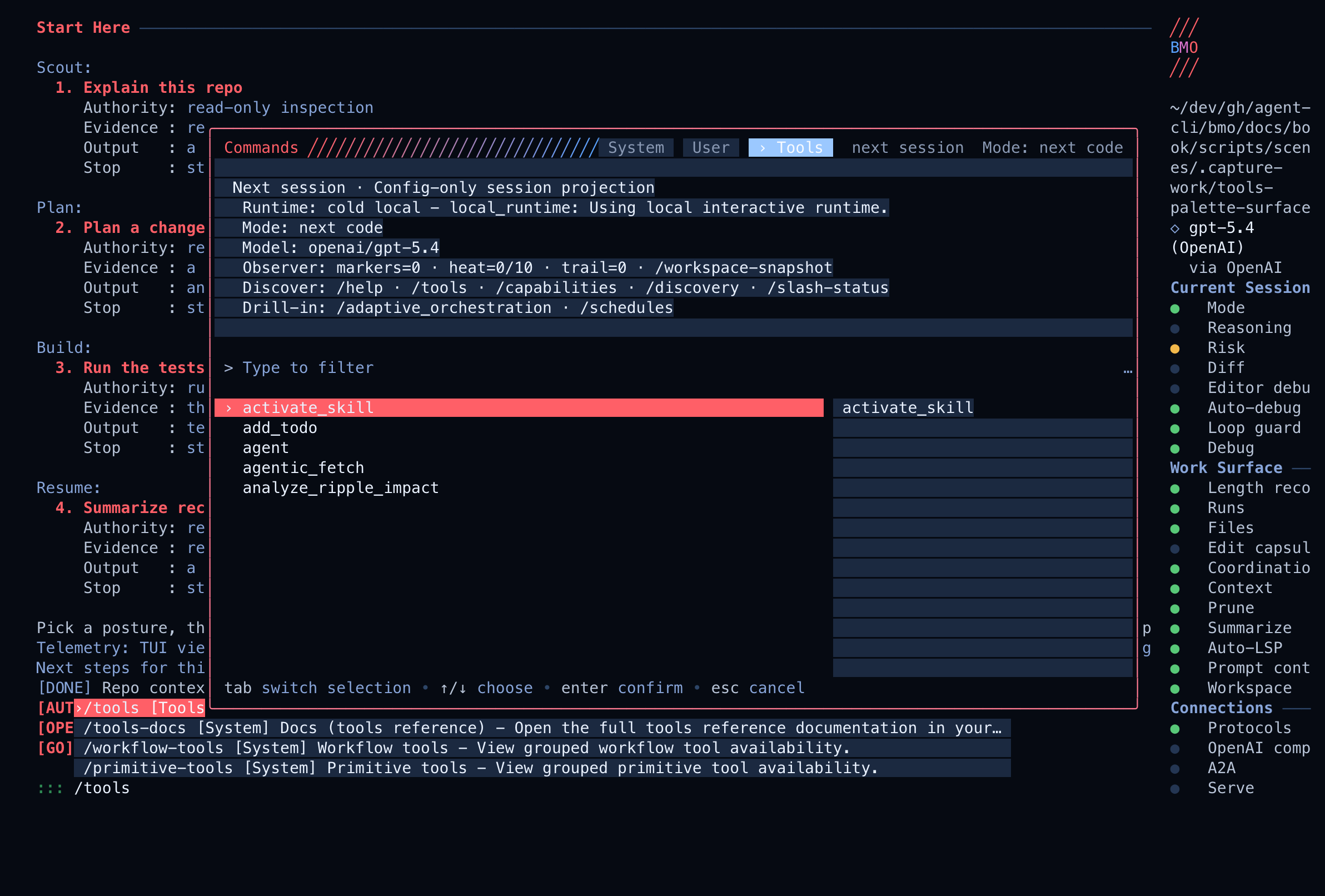
Command palette: press ctrl+p (or type /) and switch to the Tools tab to see the current tool set (after mode/tool-gate).
Chat: run /tools to browse the tool list, /capabilities for a compact summary, or /agent_kinds for the configured kind registry (see Agent kinds).
Effective tool surface in the palette
Live BMO TUI: the command palette Tools tab showing the current effective tool set after session mode, disabled_tools, and permissions narrow the registry — the surface to debug before assuming a tool is missing.
internal/agent/tool_descriptors.go is the canonical source for tool
taxonomy. Tools tagged workflow are non-primitive; everything else
defaults to primitive. Legacy multiplex tools that used the convenience
tag are removed from explicit tool configuration; use the current primary
facades. Related composition
primitives such as spawn_agent stay primitives. For when to
use workflow-tagged tools vs composing primitives, see
tools-workflows.md.
Tool gates and session modes are part of the tool contract. If a needed tool is
blocked, treat that as a real boundary: switch to the smallest suitable mode
and retry the blocked action rather than routing around the boundary with a
broader tool.
sequenceDiagram
    autonumber
    participant Operator
    participant Palette as Command palette
    participant TUI as BMO TUI
    participant Registry as Tool registry
    participant Gates as Mode and policy gates
    participant Agent as Current agent
    Operator->>Palette: ctrl+p or /
    Palette->>TUI: request Tools tab
    TUI->>Registry: read registered tools and descriptors
    Registry-->>TUI: names, descriptions, tags, input hints
    TUI->>Gates: apply session mode, disabled_tools, permissions
    Gates-->>TUI: effective tool set and blocked reasons
    TUI-->>Palette: searchable tools list
    Operator->>Palette: filter or select tool
    Palette->>Agent: insert tool-aware prompt or action
    Agent->>Gates: propose tool call
    Gates-->>Agent: allow, ask approval, or refuse
checkpoint_undo can run git reset --hard against the repository. Inspect
the target and preserve any work you want to keep before confirming.
Session checkpoint_restore rewinds conversation state only. It does not
change files on disk, running processes, or external effects. Restore
validates retained transcript identity first and refuses (with session state
unchanged) when the prefix is missing, changed, unsupported, or lacks
required evidence. Use version control or a separate backup for disk recovery.
The agent registry exposes the checkpoint_* verbs below for the session
checkpoint store.
Tool
Description
checkpoint_create
Create a named session checkpoint (transcript prefix identity, todos, file history, typed historical read evidence) for the current or specified session
checkpoint_list
List saved session checkpoints for the current or specified session
checkpoint_get
Fetch one saved session checkpoint by ID
checkpoint_update
Rename an existing session checkpoint
checkpoint_restore
Restore session context to a checkpoint whose retained transcript prefix is available and unchanged; leaves disk files unchanged; refuses instead of mixing generations
checkpoint_delete
Delete a saved session checkpoint without changing current session state
checkpoint_undo
Rewind the last git commit(s) with git reset --hard HEAD~N; intended for checkpoint recovery, defaults to 1 step, and requires confirm: true
Cancel the current session run or a specific session’s run
list_agent_runs
List persisted agent runs from the durable run ledger. Optional session_id filters a single row’s session_id; optional family_session_id returns parent and child run rows in one list (session_id or parent_session_id match — same idea as /debugger and GET /v1/agent-runs?family_session_id=…). If both are set, family_session_id wins for the session filter. MCP:bmo_list_agent_runs (opt-in via exposed_tools) returns the same JSON as GET /v1/agent-runs (full run records).
get_session_phases
Read the latest persisted per-turn phase timeline for a session (same source as TUI gloss). This is not a live process list; for in-flight coordination signals see the TUI Activity row when enabled. Integrators:/gloss is a view over this ledger—prefer get_session_phases, get_agent_run, and get_agent_run_events for automation rather than parsing gloss output.
get_agent_run_events
List ordered events for one persisted agent run (includes bash runtime seam kinds sandbox_exec_started, local_shell_started, background_job_started when recorded, alongside phases, tools, etc.)
get_agent_run
Get one persisted agent run plus derived artifacts
update_agent_run
Update a persisted agent run by run_id; currently supports action: "cancel" for active runs
fork_agent_run
Fork a run at a checkpoint-backed step into a new branch session
delete_agent_run
Delete a persisted agent run and its events from the ledger
Ledger bootstrap: Durable run rows need a data directory with bmo.db and a configured run store (normal bmo / HTTP service / autopilot service app with SQLite). The OpenAI-compat ledger path additionally requires [options.openai_compat]. When the store is not configured, list/get return errors consistent with the topic. See Durable run ledger.
Status/inspection tools are available so agents can understand host runtime
state. Mutating process-lifecycle tools are high-risk and default off:
set BMO_ENABLE_PROCESS_LIFECYCLE_TOOLS in the BMO process environment to
register them. Remote lifecycle operations also require enabled deploy
configuration.
Tool
Availability
Description
daemon_status
Default
Inspect daemon runtime status, including spawned-child audit posture and residue
Config reads and mutations route through the primary config facade. Older
verb-specific config names are migration aliases only and are rejected in
explicit allowlists with a pointer back to config.
Tool
Description
config
Read, set, unset, reload, validate, or refresh curated config through the primary config facade
get_config
Sanitized raw config inventory; use get_config_status for layered-config posture and get_config_field_provenance / bmo config explain for field provenance
get_config_field_provenance
Return the live snapshot value for one bounded config field such as options.tui.theme, with load-time source provenance when it still matches the snapshot
config_status
Compatibility text-line summary for existing agents; prefer get_config_status for the structured layered-config snapshot with bounded mutation/reload truth
get_config_status
Structured layered-config status shared with bmo config show-config-status, /config-status, GET /v1/config-status, and MCP; includes loaded-layer posture, bounded effective-field highlights, process-bounded write-target resolution, and reload aftermath on live surfaces
get_provider_auth_wizard
Provider OAuth bootstrap status and bmo auth <platform> commands (TUI: Manage Providers)
Return the current working directory, data directory, and loaded config path/dir
list_projects
List tracked BMO projects from the shared global projects registry (same data as bmo projects --json)
logs_report
Return structured log entries from the current project’s bmo.log file
stats_report
Return the same usage and audit stats JSON as bmo stats --json
capabilities
Return BMO’s short in-chat capability summary
list_agent_kinds
List configured agent kinds from effective merged config (prompt id, mesh capability tags, explicit allowlist counts)—registry scope, not the same as capabilities
list_tool_capabilities
List the currently allowed tools for the active agent (name + description)
list_models
List configured models and availability from the current config
runtime_features
List runtime feature flags and availability details from the current instance
session_observability
Read the session-summary member of the run-observability family for one session family: bounded recent run usage, token/cost totals, performance, interruptibility, and adaptive decision trace parity (same JSON as GET /v1/sessions/{id}/observability when the HTTP or autopilot service has wired the HTTP server; optional recent_runs_limit matches the HTTP query param)
run_ledger_status
Read the live attached run-ledger posture snapshot: durable agent_runs availability, OpenAI-compat ledger state, bounded reconciliation state, ring capacity, histogram, and recent metadata-only telemetry (same live JSON as GET /v1/run-ledger/posture and MCP bmo_get_run_ledger_status; bmo config show-run-ledger --format=json shares the schema but reports source=detached_projection)
list_recent_run_ledger_events
Export the raw bounded run_ledger.* ring as JSON (capacity, saturation, returned count, and metadata-only events). Use this for machine-readable recent telemetry; use list_agent_runs / get_agent_run_events for durable row or event history.
run_cue_ledger
Read the cue-oriented member of the run-observability family for one session family: active actors, cue state, expected next action, expected evidence, and recovery controls (same JSON family as GET /v1/sessions/{id}/run-cue-ledger)
inspect_run_trace
Read the trace-lens member of the run-observability family for one run in the current session family: ordered tool events plus lifecycle, activity-ledger, and corridor-shadow projections when present (same JSON as GET /v1/agent-runs/{run_id}/trace when the caller supplies or inherits session scope; use get_agent_run_events for the broader event stream)
session_diagnose
Context-budget and resume-health breakdown for one session (same JSON as bmo session diagnose --format=json; MCP parity: bmo_session_diagnose when listed in services.mcp.exposed_tools)
workspace_snapshot
Return the current workspace environment snapshot, including observer slices, optional heat-map hints, and optional environment_fields (v2: linear TTL–decayed marker intensity, optional half-life via bmo_field_half_life_seconds on leave_marker payloads, optional global session/path depositions, optional bmo_field_weight_permille) when [options.workspace_environment_fields] is enabled
workspace_claim
T1 session path claims (and T2 shared path mirror when durable hard claims enabled): acquire, renew, release, list, or negotiate path-scoped claims. Soft claims are advisory; hard claims block overlapping mutation tools from other sessions until release, yield, expiry, or negotiation. Hard claims mirror to SQLite workspace_path rows for sibling BMO processes when durable mode is on.
leave_marker
Create, list, or delete workspace stigmergy markers used for handoffs and warnings
fleet_regulation_status
Return bounded fleet-regulation aggregates and the current recommendation/proposal state
quality_gates_posture
Read metadata-only Quality Gates posture: armed surfaces, actions, judge model status, fail-open/fail-block policy, and recent decision counts
get_adaptive_orchestration
Read adaptive orchestration parity JSON for the session (same payload as MCP bmo_get_adaptive_orchestration; requires options.adaptive_orchestration.enabled)
get_teams_status
Read the Teams orchestration posture snapshot: enabled state, counts, remote/daemon posture, config snapshot, and recent metadata-safe team events.
get_journal_posture
Read live in-process Journal posture: partition binding, action/outcome histogram, ring capacity, and recent metadata-only journal telemetry.
get_journal
Read the cross-subsystem dated journal narrative for a session, matching /journal, bmo_get_journal, GET /v1/sessions/{id}/journal, and bmo config show-journal-narrative.
get_enforcement_status
Read enforcement substrate posture: enabled state, active primitives, workspace claims, explicit zone modes, and recent metadata-only enforcement telemetry.
Read flow-awareness posture: effective config and recent metadata-only flow-awareness events. Use list_recent_flow_awareness_events for the raw ring only; full dev-timeline bodies remain prompt-only.
get_apply_patch_status
Read live apply-patch/smart-apply posture: sandbox mode, smart-apply config, action histogram, and recent apply-patch telemetry.
get_prompt_stack_status
Read prompt-stack posture: ring capacity, recorded build count, and recent metadata-only prompt-stack builds.
list_recent_prompt_stack_builds
Export strict recent prompt-stack build metadata for agent workflows (metadata-only; no full prompt bodies).
get_runtime_incident_status
Read bounded runtime incident triage posture: aggregate counts, latest capsule metadata, and filter posture without listing every incident.
Read file-tool telemetry posture: ring capacity, action histogram, and recent file-tool events.
get_loop_detection_status
Read loop-detection posture: effective config, recent bounded loop evidence, and operator-facing status hints.
get_spawn_status
Read the shared spawn-pool posture snapshot: pool limits plus live containment signals such as queue depth, breaker state, drain mode, held slots, recent children, and shutdown residue when runtime was observed.
get_edit_capsules_status
Read edit-capsule posture: enablement, ring capacity, and recent edit-capsule events.
get_repo_preflight_status
Read dry contract-preflight posture: matched contract surfaces and suggested command matrix without running checks.
get_alerts_status
Read operator-alert feed posture: ring capacity and recent operator-facing alerts.
get_length_recovery_status
Read the shared length-recovery status family: summarization enablement, continuation cap, streaming-compaction posture, and bounded recent recovery outcomes for the max-output, prompt-budget preflight, and provider-context overflow lanes.
get_composition_graph
Read the config-derived composition graph advisory JSON, matching /composition_graph, bmo_get_composition_graph, GET /v1/sessions/{id}/composition-graph, and bmo config show-composition-graph.
get_compaction_reactions
Read bounded idle-gate compaction telemetry for the session. When streaming session compaction has emitted semantic quality-gate metadata, this surface may include that metadata as an adjunct readout. This is the /compaction inspector source (/compaction-reactions slash alias), not the full session-compaction contract; use describe_context or bmo session status for the broader session-compaction posture.
sandbox_status
Read the sandbox execution posture without starting Docker, dialing SSH, invoking BuildKit, or running a command: command-execution backend, direct/staged file-write mode, background-shell support, validation-lane summary, and the bounded metadata-only sandbox.* ring (same read model as bmo config show-sandbox and the TUI /sandbox slash).
get_finding_lifecycle_status
Read the full finding-lifecycle status snapshot — ingest counters and the bounded recent-events ring in one call (same data as bmo config show-finding-lifecycle and the TUI /findings slash). Optional permissive session_id filter; the ring carries metadata only.
list_recent_finding_lifecycle_events
Read the strict per-session view of recent finding-lifecycle ring events (metadata-only). Pair with get_finding_lifecycle_status for ingest counters and the permissive sidebar view.
describe_context
Read a panoramic context snapshot for the session: token budget, effective pruning flags, memory configuration, compaction-reaction summary, shared session-compaction posture, and codebase_context counts/status (same source as the TUI /context hub). Optional refresh_codebase_context: true runs an auxiliary snapshot walk subject to options.codebase_context.min_refresh_interval_seconds
eval_shadow_summary
Return the bounded eval-shadow posture summary across recent runs, scorecards, latest timestamps, and proposal state so prompt and orchestration changes are measurable without enumerating raw artifacts. See Eval shadow summary and Shadow Evals.
Requires options.operating_packs = true in config and a session pack controller. Parity for the read-only JSON snapshot is documented in Operating mode parity.
Tool
Description
session_set_pack
Activate an operating pack for the current session (preset id from options.operating_mode_presets or pack name/path). HTTP parity: POST /v1/session-operating-mode (Bearer auth; same fields as tool JSON).
session_clear_pack
Clear the active operating pack for the session. HTTP parity: DELETE /v1/session-operating-mode?session_id=….
session_list_packs
List discoverable operating packs for the workspace
session_get_active_pack
Return details for the session’s active pack, if any
get_operating_mode
Return redacted posture JSON: session_id, enabled, state, active_operating_pack, operating_mode_preset_id, optional pack_manifest_path, diagnostics, and active-pack counts (same object as GET /v1/session-operating-mode and MCP bmo_get_operating_mode)
Run the project initialization flow that discovers context, loads instructions, and clears any prior onboarding dismissal before the configured context file is created or refreshed
set_plan_artifact
Store or update the staged-workflow plan artifact (markdown); advance to execute with /approve in the TUI or approve_plan
get_workflow_phase
Read the current staged-workflow phase and approval-pending state
get_staged_workflow_status
View the bounded staged-workflow session posture
approve_plan
Approve the staged plan and move the session to execute phase (same as TUI /approve)
return_to_plan
Move a staged workflow back to the planning phase
get_plan
Read the currently stored plan artifact
clear_plan
Remove the stored plan artifact
todos
Create or replace the full session-local structured task list; not for Markdown checkboxes or workstream findings
run_recipe
Execute one recipe YAML as a workflow run
recipe_list
List available recipes
recipe_validate
Validate a recipe without running it
schedule
Create, list, inspect, run, pause, unpause, update, or delete scheduled recipe jobs through the primary scheduling facade
get_scheduler_status
View scheduler posture
get_provider_status
View provider-management posture and latest lifecycle summaries
contract_rerun
Re-run change-contract validations for the current work
contract_verify_sqlc
Explicitly verify an accepted SQLC binding against the pinned native generator after command-execution approval
contract_list_obligations
List outstanding change-contract obligations
contract_waive_obligation
Waive one change-contract obligation by ID
analyze_ripple_impact
Best-effort follow-up edits in other files after a change (ripple/LSP-backed); registered tool name (implementation file suggest_next_edits.go)
summarize_session
Trigger session compaction on demand by summarizing session history into a compact continuity artifact. This is part of the active-session recovery path, not the idle-gated background compaction executor.
spawn_worktree_override
Read or change the session-level next-spawn worktree and auto-remove override
Load one custom agent by name (metadata and instructions)
create_custom_agent
Create a new custom agent definition on disk (mutates config data; may require approval)
update_custom_agent
Update an existing custom agent definition
delete_custom_agent
Delete a custom agent definition file
custom_agent_run
Queue a custom agent into the current session by name
spawn_agent
Spawn a child agent with a prompt and scoped tool set
request_protected_child
With the coordinator objective guard enabled, record a pending reference to an already signed protected root by exact ID; this does not dispatch a child or grant execution
wait_agent
Block until a child agent completes; stream or collect output
send_input
Inject a follow-up message into a running child agent
get_agent_output
Read partial or final output without blocking
close_agent
Terminate a child agent and release its resources
list_agents
List all active child agents with their status (includes spawned_by + explain when available)
spawn_agents_on_csv
Fan out agents over CSV rows; each row becomes an isolated job
report_agent_job_result
Report one worker result back to a CSV fan-out batch
create_team
Provision a named team of persistent, goal-oriented sub-agents
mesh_resolve
Resolve agents by capability; returns candidate node_id and display name to help build an explicit create_team roster (requires mesh)
decompose_task
Break a goal into subtasks before or during team creation
team_task_create
Add a task to an existing team
team_task_list
List tasks for a team
team_task_get
Get one task from a team
team_task_update
Claim, run, complete, or fail a team task
team_task_delete
Delete one task from a team
team_message_send
Send a direct message to a teammate
team_message_list
Read queued unread team messages
team_message_get
Read one team message
team_message_update
Update one team message
team_message_delete
Delete one team message
team_events
Stream or list team lifecycle events
team_broadcast
Send the same message to all teammates
team_shutdown
Shut down a running team and collect task status
team_list
List known teams
team_get
Get one team and its metadata
team_delete
Delete a persisted team
team_cleanup
Remove stale team state and cached resources
team_update
Update editable team metadata
team_package_pull
Pull one OCI team package into the cache (same as CLI bmo team package pull).
team_package_list
List cached team packages (same as CLI bmo team package list).
team_package_remove
Remove one cached team package (same as CLI bmo team package remove).
team_package_update
Refresh a cached team package (same as CLI bmo team package update).
In the TUI, ctrl+enter or /enqueue queues user text for the turn after the current run completes. The queue_enqueue tool uses the same coordinator queue (not the same contract as message, which injects into the transcript with permission flow). Technical detail: prompt-queue-parity.md.
Tool
Description
create_session
Create a new session
switch_session
Switch the active session
list_sessions
List known sessions
get_session
Read one session’s metadata
update_session
Update editable session metadata
delete_session
Delete a session
message
Send, list, inspect, update, or delete session messages. Content is persisted as given. For maintained review prompts, use view on the workspace-root prompt corpus from a maintainer workspace checkout outside this repository.
session_search
Search prior session transcripts or list recent sessions
get_prompt_queue_status
Inspect the current queued-prompt state
queue_enqueue
Enqueue a prompt to run after the current turn completes (TUI ctrl+enter / /enqueue parity)
Requires options.edit_capsules = true and a wired edit-capsule service. HTTP list/create/update/delete for capsules is documented under Edit capsules (HTTP) (GET reads follow the shared bound-session contract; POST starts a capsule only and does not mirror the full create_edit_capsule tool flow).
Read or mutate the shared session-mode status family: current mode, reachable modes, deferred mode-change posture, and the latest bounded autoselect/manual-override fact for the session
get_session_posture_status
Read the canonical session-posture status family: desired posture genome, committed choreography state, pending transition conditions, and operator lock status
set_session_model
Switch the current session to a configured model
set_reasoning_effort
Update the current model’s reasoning-effort setting when supported
These tools are tagged workflow in the registry (multi-step or bundled
behavior). Everything else defaults to primitive. Multiplex tools such as
contract_obligations, fleet_policy, legacy workflow_checkpoint,
daemon_control, autopilot_control, and memory_projection_update are not registered;
use their current primitive replacements or primary facades.
Tool
Description
agent
Run a child task agent with its default tool set.
spawn_agents_on_csv
Fan out agents over CSV rows; each row becomes an isolated job.
agentic_fetch
Multi-step fetch chain for complex web research.
create_team
One-call team formation from an explicit teammate roster: team record, spawned teammates, optional preloaded subtasks (primitive alternative: mesh_resolve + decompose_task + team_create + spawn_agent + team_task_create).
Unified v2 workflow tool family for defining, starting, and checkpointing multi-step workflows.
execute_dag
Execute a validated A2A DAG with checkpoint support.
orchestrate_workflow
Execute a DAG of A2A invocations with checkpoint support.
deploy_agent
Build, push, and deploy an agent image (multi-step deploy workflow).
deploy_fleet
Deploy multiple agents from a fleet specification (multi-step fleet deploy workflow).
Staged workflow uses set_plan_artifact, get_workflow_phase, get_plan, clear_plan, return_to_plan, and approve_plan (all primitive in the registry). There is no submit_plan tool; approve with /approve or approve_plan.
Bundled pipelines (primitive taxonomy, multi-step runtime):run_recipe and summarize_session are primitive in registry taxonomy but internally run multi-step pipelines (RegistryRuntimeShapeBundledPipeline). They are not tagged workflow.
Workflow-tools inspect family: Use bmo config show-workflow-tools for the config-only grouped view, /workflow-tools for the live TUI report, get_workflow_tools_status for the agent-native JSON surface, GET /v1/workflow-tools for HTTP, and bmo_get_workflow_tools_status for MCP. The shared snapshot keeps workflow-tagged tools, bundled-pipeline primitives, and staged-workflow controls separate with bounded availability reasons.
Primitive-tools inspect family: Use bmo config show-primitive-tools for the config-only grouped view, /primitive-tools for the TUI grouped report, get_primitive_tools_status for the agent-native JSON surface, GET /v1/primitive-tools for HTTP, and bmo_get_primitive_tools_status for MCP. The shared snapshot keeps direct single-action primitives, bundled-pipeline primitives, and gated/runtime-sensitive primitives separate, and includes bounded recent primitive-family activity from the shared execution boundary.
Delegate to a remote A2A agent: agent_card_url, deployed agent_name, or capability (mesh resolve + invoke; multi-candidate transport fallback). Continues via task_id / context_id. See A2A.
delete_a2a_task
Delete an A2A task by ID
execute_dag
Execute a validated A2A DAG with checkpoint support
orchestrate_workflow
Execute a DAG of A2A agent invocations with dependency tracking, parallel fanout, and template interpolation
workflow_template
Save, list, inspect, update, or delete named DAG workflow templates
Use search and edit semantic modes when you want symbol-aware navigation or
edits instead of text matching.
Run the search symbol overview mode when you know the file and need its
structure, or the search symbol lookup mode when you know the symbol name
but not the file.
Copy the exact selector from the result.
Run the matching edit structural mode: rename symbol, replace symbol body,
insert before symbol, or insert after symbol.
If staging is enabled and the edit touches multiple files, review the
staged batch before accepting it.
name_path is the human-readable semantic path for a symbol within a
file, such as Coordinator.Run. It is the default selector to copy out
of discovery results.
symbol_key is the more precise selector when the runtime surfaces it. It
is intended for duplicate, overloaded, or otherwise ambiguous symbol
paths.
Prefer exact semantic selectors over reconstructing symbol names from raw
source text.
Semantic renames can touch more than one file because the language server
may return declaration and reference edits together. BMO routes those edits
through the same permission, staging, history, and reflection pipeline as
other write tools. When staging is enabled, review the staged batch first
and then accept or reject it like any other grouped edit.
There is no dedicated file_picker or open_editor tool. File attachment and
file-editing parity is achieved through message, view, search, edit,
attachment, and file_history, which operate directly on workspace paths or
session-scoped artifacts.
Plugin management has agent parity through plugin_list,
plugin_install, plugin_update, and plugin_remove. The mutating plugin
tools still require approval because they change the shared plugin directory.
bmo auth <platform> is intentionally human-only bootstrap. It requires browser or
device-code handoff, so agents should surface the need to re-authenticate
rather than trying to complete the login flow themselves.
Process-lifecycle mutation is gated rather than broadly available. Agents may
inspect process-backed state (daemon_status, autopilot_status,
schedule_inspect) by default. Starting/stopping/restarting long-lived
processes requires operator opt-in with BMO_ENABLE_PROCESS_LIFECYCLE_TOOLS
before daemon_restart, autopilot_up, or autopilot_down are registered.
daemon_status is read-only. When a coordinator is present it also reports
spawn_isolation_audit, including whether tracked children are
session_only, runtime_backed, or mixed, along with bounded PID and
cleanup-pending / cleanup-failed counters and per-finding PID-backed orphan
evidence when available.