
Stigmergic delivery
In plain terms: instead of agents talking to each other over a shared chat channel, they leave small signals in the workspace as they finish work — like notes that pile up where attention is needed. You read where the work is accumulating and what to look at next. “Stigmergic” is just the name for this coordinate-by-environment pattern (it is how ants coordinate via trails).
Stigmergic delivery answers one operator question: what is accumulating in the workspace, where is pressure building, and what should I inspect next — without opening a shared chat channel? Agents and workflows leave bounded signals after work completes; operators and tools read zone pressure, manifests, triage queues, and causal explain packets through the same getters whether you ask from the CLI, TUI, agent tools, or MCP. HTTP exports the status read model only; explain and triage use the other surfaces.
It is BMO’s indirect coordination loop — substrate-time accumulated decisions rather than synchronous request/response between actors. Three nouns recur throughout this page:
- Feature — Stigmergic delivery (the operator-facing capability)
- Read model — shared status, zone pressure, explain, and triage packets
- Envelope — the rendered posture (
RenderStigmergyDeliveryStatus) and parity JSON across surfaces modulocaptured_at
In the public docs taxonomy, Stigmergic Delivery is a core concept rather than just another feature. It is the grounding page for signal-shaped coordination; see Concept Map for the surrounding families.
Route fit: read this page when you need the concept and operator mental model for indirect coordination. Use the feature/action sections below only after that concept is clear; workflow selection and exact command lookup stay as backstops in the linked feature and reference pages.
Availability: At least one of
options.workspace_markers.enabled or options.signal_fabric.enabled must
be on. bmo config show-stigmergy-delivery renders a clear disabled posture
when both are off. Recommendation and triage packets are read-only;
accept, dismiss, prune, reinforce, and kill remain separate explicit
commands.
When to use it
Section titled “When to use it”- You need a single read-only posture for workspace markers and signal fabric without tailing logs.
- Zone pressure is climbing and you want the ranked triage queue before accepting manifests or spawning follow-on work.
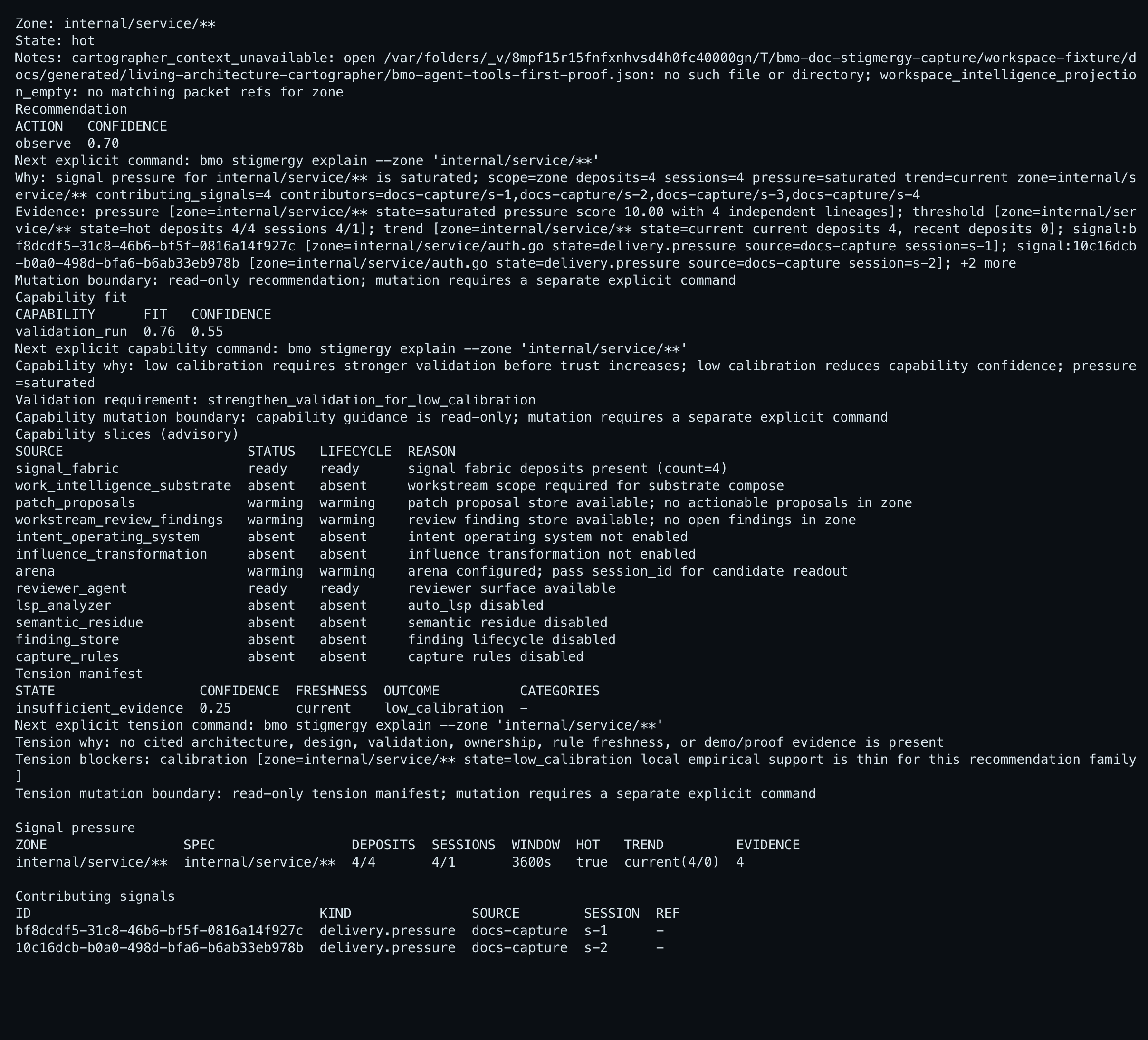
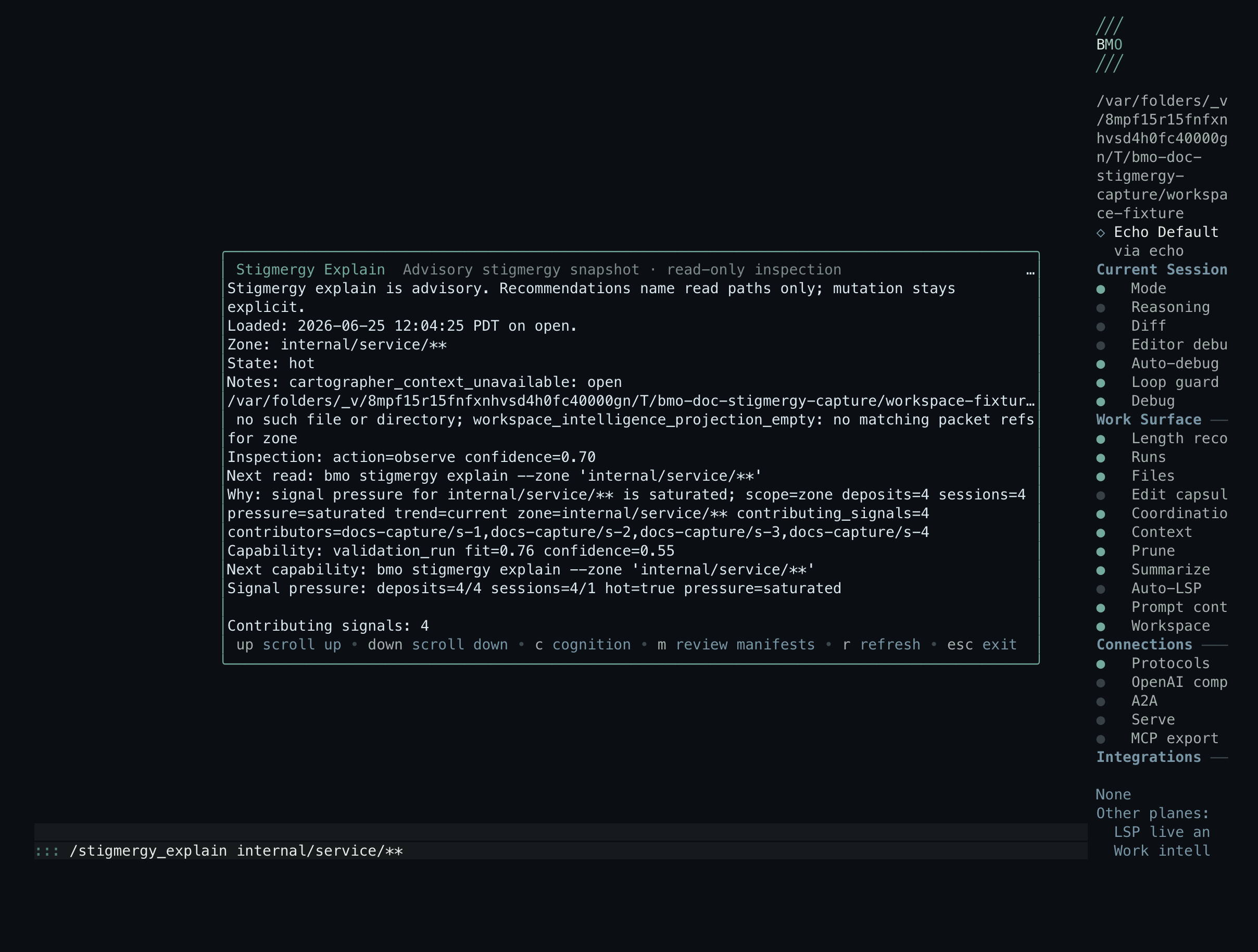
- You need a causal drill-down for one zone — recommendation packet, capability-fit guidance, cited evidence, and explicit next command.
- You want the same JSON from TUI, CLI, HTTP, native agent tools, or MCP for operator scripts or in-process agents.
- You are pairing
stigmergy.fired→stigmergy.actionevents in logs and want the status ring to corroborate.
Use Workspace trail when the question is aggregate trail and marker inventory, not delivery-loop pressure and recommendations. Use Fleet runtime observability when the question is fleet-regulation loop health, not workspace stigmergy.
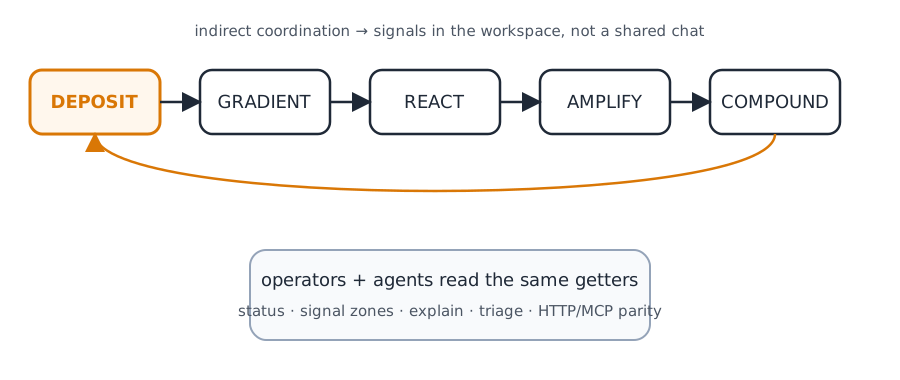
The five-stage loop
Section titled “The five-stage loop”Stigmergic delivery is organized as a feedback loop. Each stage has a distinct runtime role; together they let multi-agent work compound across sessions and restarts without a central chat bus.
| Stage | One-line role | Operator surfaces |
|---|---|---|
| DEPOSIT | Leave markers and typed signals after work completes | Workflow bridges, nanite completion, leave_marker, leave_signal |
| GRADIENT | Read markers to influence routing and rank hot zones | /signal-zones, bmo signal zones, zone pressure in workspace_snapshot |
| REACT | Spawn or recommend inspection when conditions are met | /stigmergy_triage, bmo stigmergy triage, automation rules |
| AMPLIFY | Reinforce success; decay failure over time | Mesh niche scores, adaptive-context pheromone |
| COMPOUND | Combine outputs from multiple agents | Convergence executors, fabric-native induction manifests |
flowchart LR
    deposit[DEPOSIT markers and signals]
    gradient[GRADIENT zone pressure]
    react[REACT triage and rules]
    amplify[AMPLIFY niche and pheromone]
    compound[COMPOUND convergence]
    deposit --> gradient --> react --> amplify --> compound
    compound --> deposit
Config gates
Section titled “Config gates”| Gate | Purpose |
|---|---|
options.workspace_markers.enabled | DEPOSIT paths (markers, workflow bridges) |
options.signal_fabric.enabled | GRADIENT / zone pressure readouts |
At least one must be enabled. When both are off, the status family reports disabled with explicit next surfaces once you enable a gate.
GRADIENT: signal zones
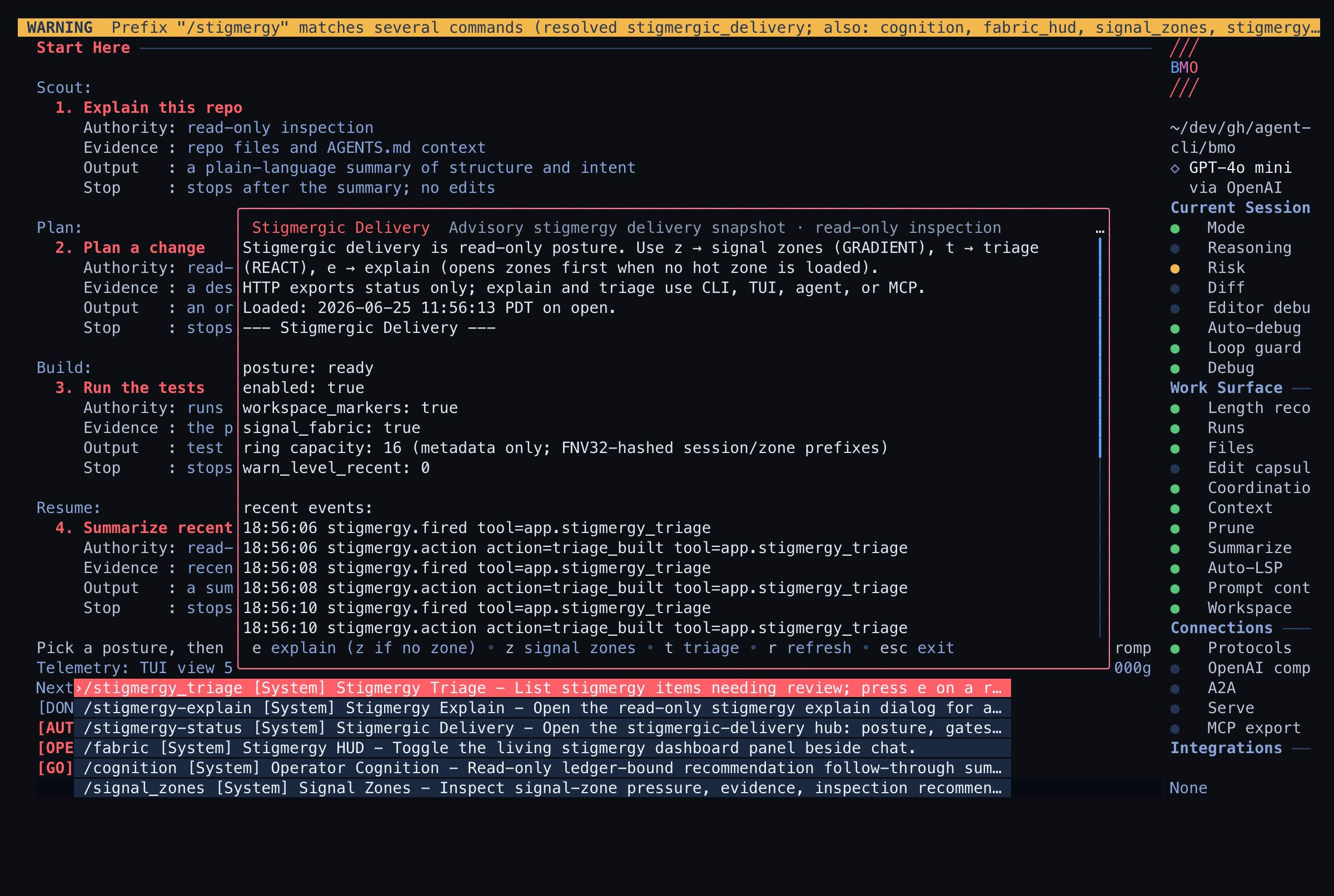
Section titled “GRADIENT: signal zones”Signal zones are the canonical pressure read surface. Use them when the operator question is “which zones are hot, contested, or cooling?” — not merely “are there recent deposits?”.
- TUI:
/signal-zones(aliases/signal_zones,/zones) - CLI:
bmo signal zoneswith--pressure-state,--sort,--hot - Agent / MCP:
leave_signallist actions and signal-zone readouts withpressure_states/include_threads
Signal zones are advisory. They do not accept manifests, prune rules, or
mutate deposits. When zones match configured saturation specs, press e on a
row to open zone explain and m for rule manifest review. An empty snapshot
means no zones matched current specs yet — deposit signals or tune
options.signal_fabric saturation specs before expecting ranked rows.
Operator route (TUI)
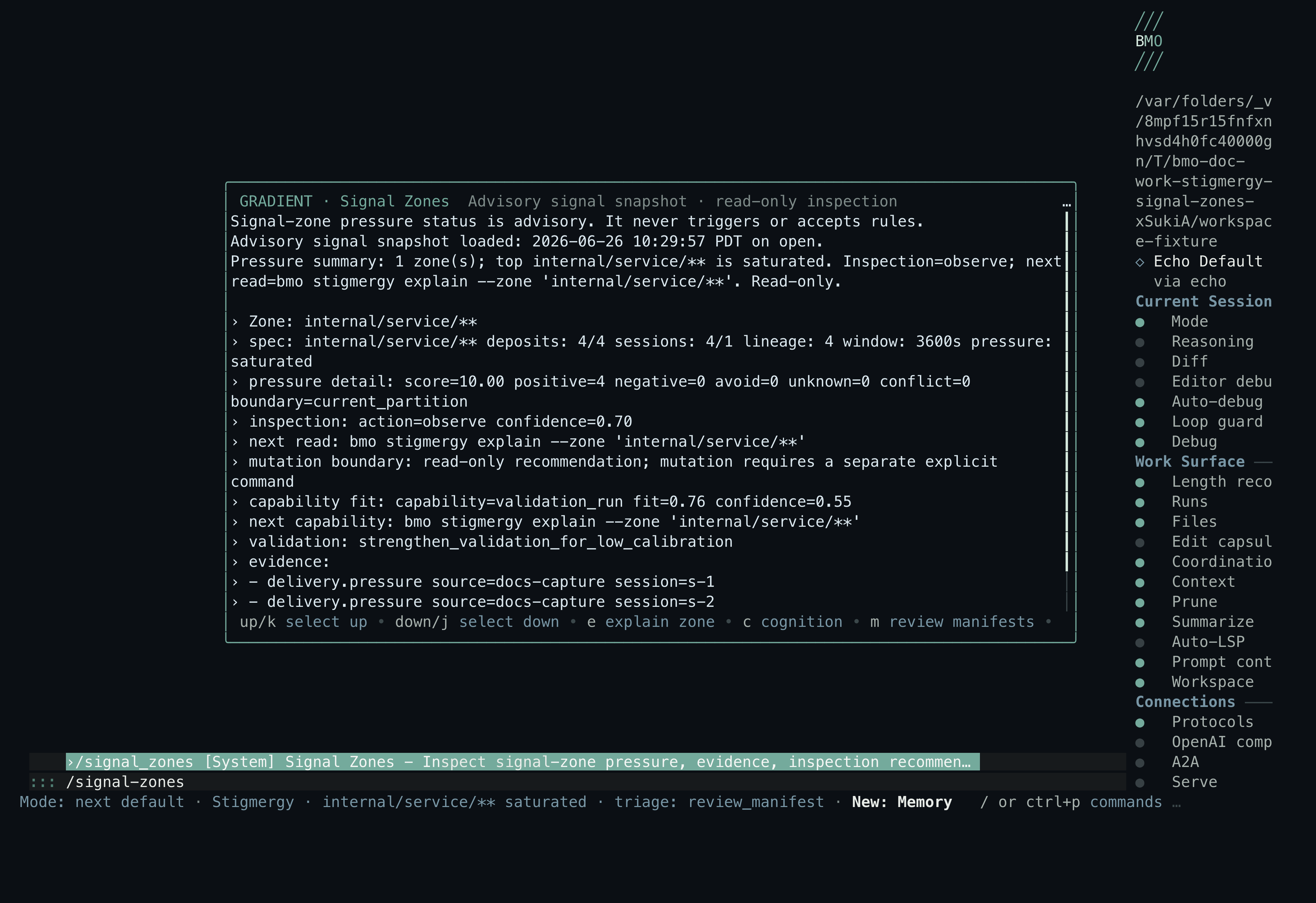
Section titled “Operator route (TUI)”The TUI front door is a managed Stigmergic Delivery hub dialog — not a chat
transcript dump. Open it from the status bar hint, /stigmergy, or
/stigmergy-status (alias /stigmergy-delivery). From the hub, drill into
GRADIENT signal zones (z), REACT triage (t), or explain when a zone is
selected (e). Signal zones and triage also open explain on e when rows
exist.
flowchart LR
  subgraph entry [Operator entry]
    SB[Status bar]
    SL["/stigmergy /stigmergy-status"]
    DISC[Discovery group]
  end

  HUB[Stigmergy Delivery hub dialog]
  ZONES["GRADIENT · Signal Zones"]
  TRIAGE["REACT · Stigmergy Triage"]
  EXPLAIN[Stigmergy Explain]

  SB --> HUB
  SL --> HUB
  DISC --> HUB
  HUB -->|z| ZONES
  HUB -->|t| TRIAGE
  ZONES -->|e| EXPLAIN
  TRIAGE -->|e| EXPLAIN
The live capture below shows the hub dialog posture readout.
REACT: triage and explain
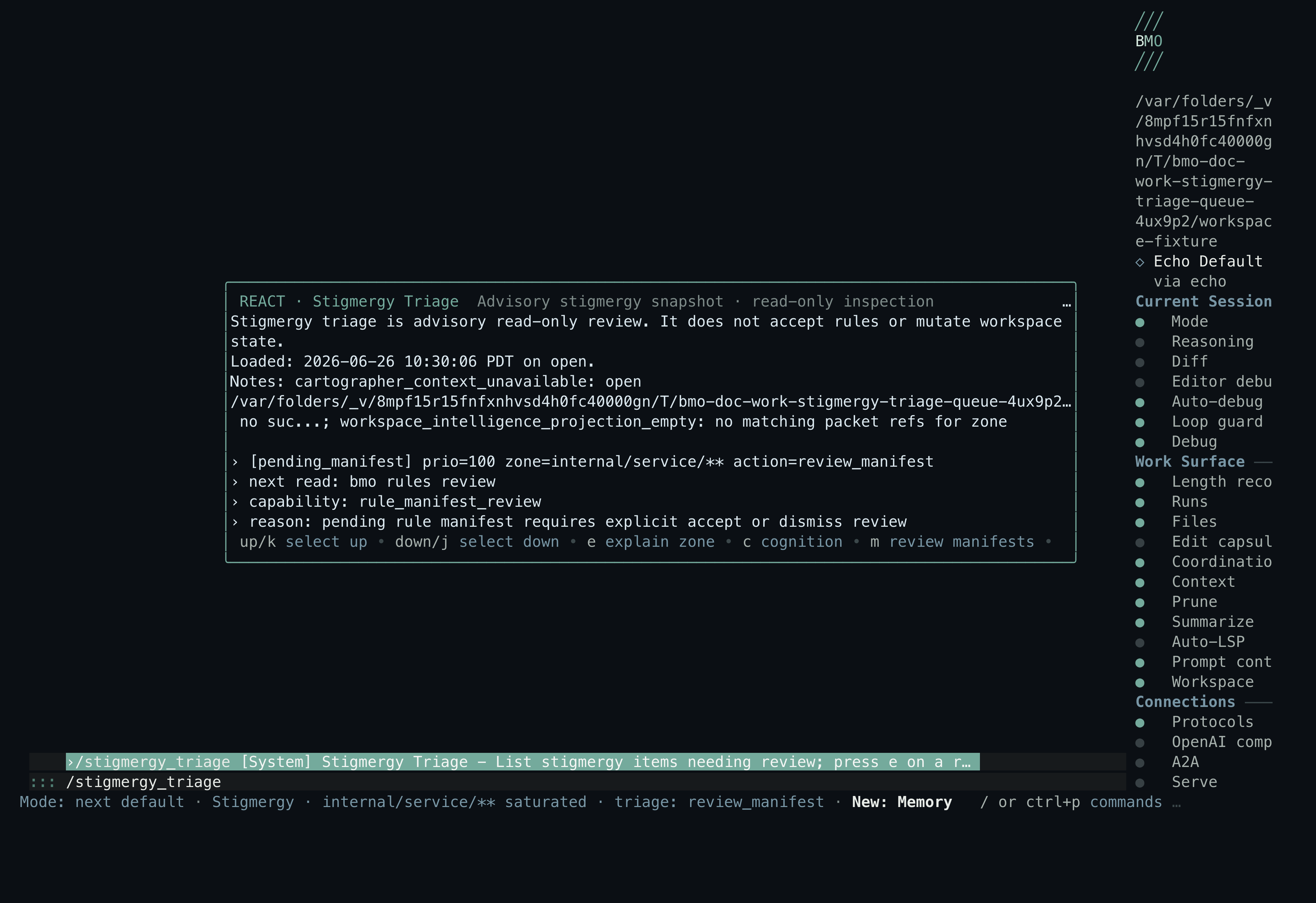
Section titled “REACT: triage and explain”Triage ranks what deserves inspection now: pending manifests, stewardship findings, suppression diagnostics, and actionable zone pressure without a direct rule item. Explain composes the causal packet for one zone after triage (or signal zones) selects it.
| Question | Surface |
|---|---|
| ”What should I look at first?” | bmo stigmergy triage, /stigmergy_triage, stigmergy_triage |
| ”Why does this zone matter?” | bmo stigmergy explain --zone '<glob>', /stigmergy_explain <glob>, explain_stigmergy |
| ”What command is explicitly next?” | recommendation.next_explicit_command in the explain/triage JSON |
Triage supports --sort heat and --group threads on the CLI; the agent
tool accepts the same sort and group fields. Explain and triage rows carry
an evidence-bound recommendation packet with confidence, cited evidence,
blocking evidence, and a read-only derivation ledger — agents should
consume that packet instead of inferring the next step from prose.
Cross-surface parity
Section titled “Cross-surface parity”The same getters flow through CLI, slash, agent tools, and MCP. HTTP currently
exports the status read model only (GET /v1/stigmergy-delivery/status);
explain and triage use CLI, TUI dialogs, agent tools, or MCP. Parity tests
assert JSON equality modulo captured_at across every surface, preventing
formatter divergence.
sequenceDiagram
    participant Operator
    participant TUI as TUI slash and dialogs
    participant CLI as CLI stigmergy and config
    participant Agent as Agent and MCP tools
    participant HTTP as HTTP status only

    Operator->>TUI: /stigmergy or /stigmergy-status (hub)
    Operator->>TUI: /stigmergy_triage or explain via hub / zones / triage e
    Operator->>CLI: bmo config show-stigmergy-delivery
    Operator->>CLI: bmo stigmergy explain and triage
    Operator->>Agent: get_stigmergy_delivery_status
    Operator->>Agent: explain_stigmergy and stigmergy_triage
    Operator->>HTTP: GET /v1/stigmergy-delivery/status
    Note over TUI,Agent: Status on HTTP explain and triage on CLI TUI agent and MCP
Posture vocabulary
Section titled “Posture vocabulary”| Field | Meaning |
|---|---|
posture: disabled | Both workspace_markers and signal_fabric gates are off |
posture: ready | At least one gate is on and no recent failure-class ring events |
posture: degraded | Gates are on but recent failure-class stigmergy events are present |
recent_events | Metadata-only ring with hashed session/zone prefixes — not raw drill-in |
Status, explain, and triage packets are read-only. They name explicit next commands but never accept manifests, prune rules, or mutate deposits.
Enable workflow
Section titled “Enable workflow”Enable at least one gate in bmo.toml:
[options.workspace_markers]enabled = true
[options.signal_fabric]enabled = true
# Optional: rank hot zones once deposits cross thresholds[[options.signal_fabric.saturation_specs]]zone_glob = "internal/**"min_deposits = 2min_sessions = 1window_seconds = 3600
Signal-zone and triage readouts stay empty until deposits and saturation specs
match your workspace. Use bmo signal deposit or agent leave_signal to seed
pressure, then reopen /signal-zones or /stigmergy_triage. Live doc captures
seed deposits against a maintainer-internal workspace fixture so screenshots
show saturated zones rather than an empty snapshot.
Read-only contract
Section titled “Read-only contract”Recommendation and triage surfaces never auto-execute the next step. They
return evidence-bound packets with recommendation.next_explicit_command and a
mutation boundary that states read-only guidance. Accept, dismiss, prune,
reinforce, kill, and rule lifecycle changes stay on their dedicated commands.
Surfaces
Section titled “Surfaces”| Surface | Entry |
|---|---|
| CLI status | bmo config show-stigmergy-delivery |
| CLI readouts | bmo stigmergy explain --zone '<glob>', bmo stigmergy triage |
| Agent tools | get_stigmergy_delivery_status, explain_stigmergy, stigmergy_triage, list_recent_stigmergy_events |
| MCP | bmo_get_stigmergy_delivery_status, bmo_stigmergy_explain, bmo_stigmergy_triage |
| HTTP | GET /v1/stigmergy-delivery/status |
| TUI | /stigmergy and /stigmergy-status (hub dialog); /signal-zones, /stigmergy_triage, /stigmergy_explain <zone>; explain dialog from hub, triage, or signal-zones e; status bar Stigmergy: hint; ambient Stigmergy HUD panel (/fabric_hud) |
| Tracing | stigmergy.fired / stigmergy.action — see tracing |
The TUI hub route is /stigmergy (alias /stigmergy-status, /stigmergy-delivery).
/stigmergy previously opened triage; triage is now only at /stigmergy_triage
and /stigmergy-triage. Signal zones remain the GRADIENT pressure surface;
explain opens from the hub, /stigmergy_explain <zone>, triage (e),
signal zones (e when rows exist), or the CLI/agent tools.
Discovery aliases let /stigmergy typing surface the whole family by name:
/stigmergy_zones and /stigmergy-zones resolve to /signal-zones;
/stigmergy_hud and /stigmergy-hud resolve to /fabric_hud (Stigmergy HUD).
Canonical commands stay the entries above; the aliases are operator-affinity for
prefix completion.
See it work
Section titled “See it work”
A proposed rule surfaces, the operator asks why, and the agent answers beside
the pinned stigmergy HUD: the internal/service/** zone is saturated (4/4
deposits across 4 sessions) with a rule manifest staged for explicit review —
recommendations stay advisory; mutation stays explicit.
The four beats above map onto the loop on this page: DEPOSIT (the pre-seeded rule banner), the operator’s question, GRADIENT (the pinned HUD’s zone readout), and REACT (the read-only explain packet). Nothing in that sequence mutates state — accepting a manifest is the separate explicit command described under Read-only contract.
To read the same zone pressure in your own workspace, configure saturation
specs, seed deposits with bmo signal deposit, then run bmo signal zones —
no provider key required for the zone readout itself. The recording above also
makes a live provider call for the agent’s answer, so that portion needs
credentials. The demo recordings’ scenario sources, fixtures, and renderers are
maintainer-internal and are not distributed.
What it is not
Section titled “What it is not”Stigmergic delivery does not:
- replace synchronous language-time analysis (see LSP integration)
- auto-execute recommendations (read-only guidance; explicit commands mutate)
- expose raw session or zone identifiers in the status ring (hashed prefixes only)
- ship a hosted conformance service (maintainer sibling-spec harness only)
Maintainer detail
Section titled “Maintainer detail”Stigmergic delivery topic — five-stage taxonomy, maintainer validation guidance (conformance and cross-surface parity harnesses), calibration ledger, and non-goals.
Status-family recent telemetry is metadata-only with hashed session/zone
prefixes; use explain, triage, or list_recent_stigmergy_events for raw
drill-in. Maintainer CI lanes are documented in
docs/topics/quality/ci.md.
Related
Section titled “Related”- Concept Map — concept-first navigation
- Workstreams and Factory Patterns — durable rows that can carry accumulated signals
- Arena — adjacent decision forum when the next step is model comparison
- Programmable Signal Fabric — typed signal deposits and FNI manifests
- Workspace trail — DEPOSIT substrate markers and trail
- Work intelligence — capability packets and layer precedence
- Fleet runtime observability — sibling runtime-observability pattern