
Multi-Agent Workflows
Overview
Section titled “Overview”BMO’s multi-agent tools (spawn_agent, wait_agent, list_agents,
create_team, and spawn_agents_on_csv) let you run parallel workloads, fan
out over data, and coordinate teams inside one session.
See the full technical reference in Advanced: Multi-Agent.
Before a larger fan-out, use Coordination status
or /coordination to check which coordination surfaces are active or degraded.
The aggregate status is a read-only router: it tells you whether to inspect
spawn status, teams, mesh, task bus, or another row before assigning work.
Parallelize independent tasks
Section titled “Parallelize independent tasks”I want to do three things in parallel:1. Write tests for internal/api/2. Write tests for internal/auth/3. Write tests for internal/db/
Spawn one sub-agent per task and wait for them all.BMO will typically spawn three agents and then wait on them with
wait_agent(ids=[...]).
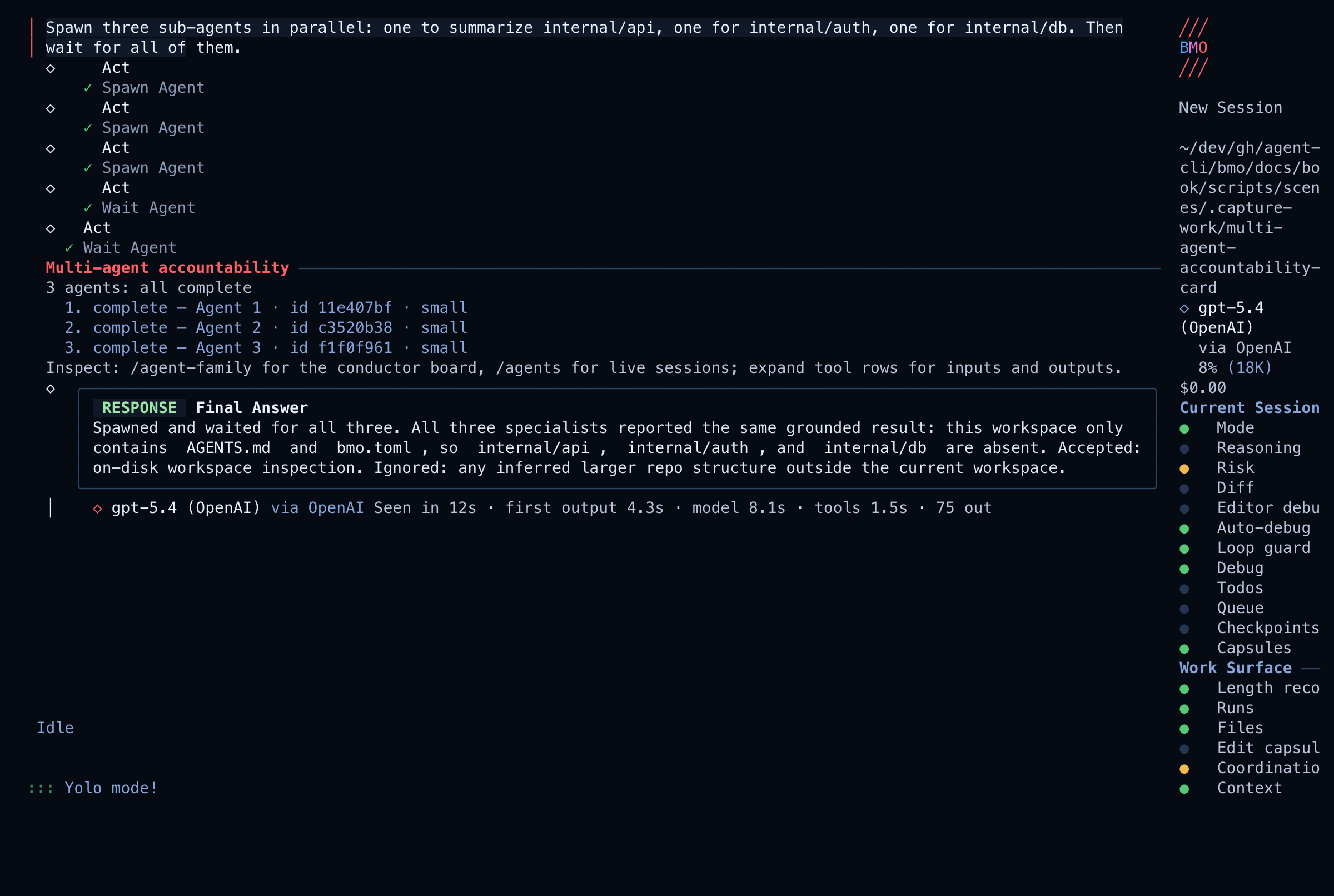
What you should see: In the TUI, the main chat shows a Multi-agent
accountability card for the current session. It lists each local child ID,
status, and short progress label, plus active/done/degraded counts. Raw
spawn_agent and wait_agent rows stay available through expansion, so the
tool inputs and outputs remain inspectable without dominating the default view.
/agent-family is the richer drill-in: it opens a ranked conductor view and
can toggle into a grouped board view for active parallel work.
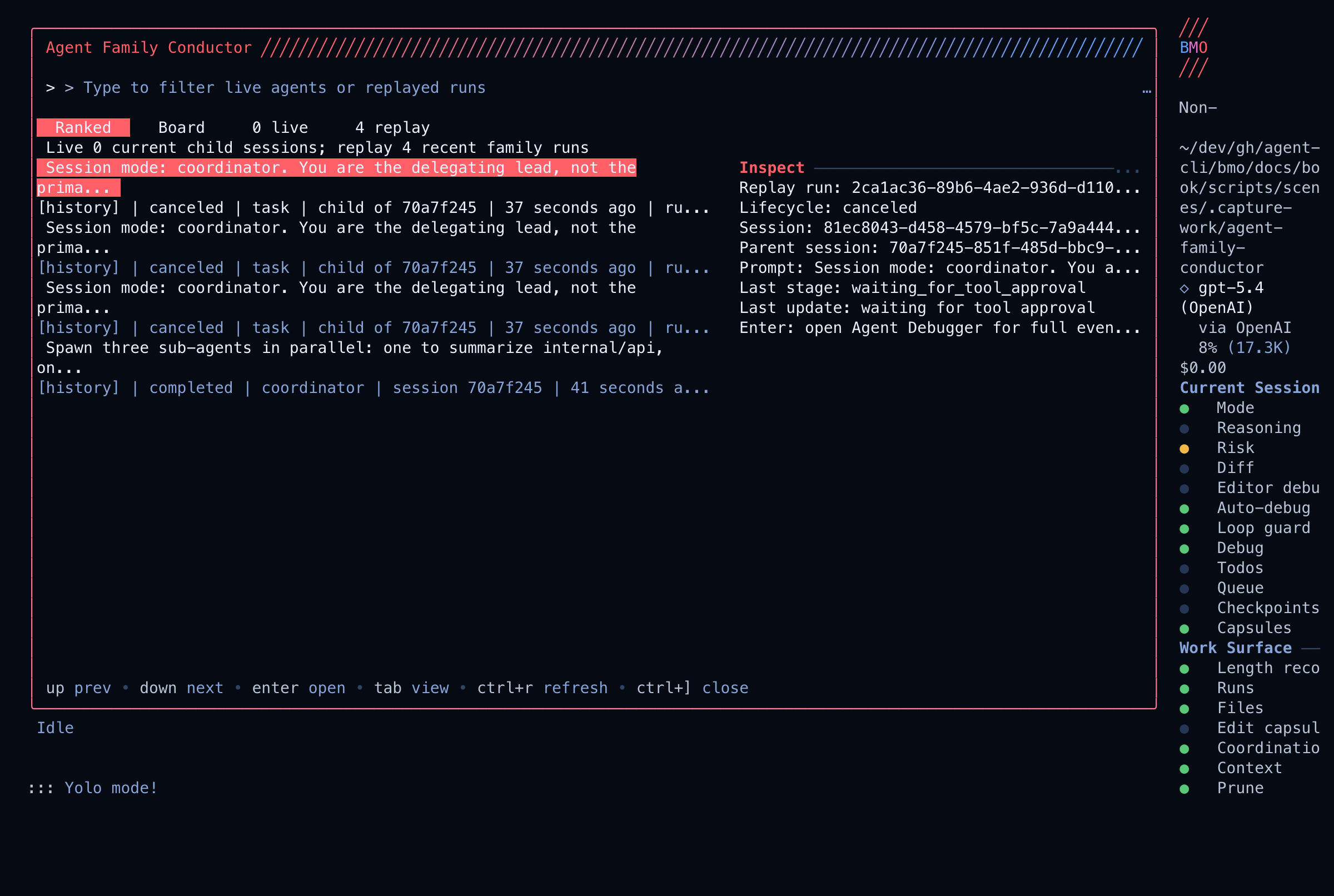
Verify it worked: Use list_agents, /agents, or /agent-family to
confirm child status and inspect raw outputs. /team is for team or CSV-job
surfaces, not the primary local child-agent inspector.
Recovery: Press esc to interrupt the parent agent. Spawned agents that are still running will be cancelled. No files are written by sub-agents until you approve tool calls (unless --auto-approve-tools is set).
Fan out over a list
Section titled “Fan out over a list”Create a CSV with one task per row, then:
Fan out functions.csv to parallel agents.Each agent should implement the function described in its row.functions.csv:
function,file,descriptionParseJWT,internal/auth/jwt.go,Parse and validate a JWT stringValidateToken,internal/auth/token.go,Validate token expiry and claimsHashPassword,internal/auth/password.go,Bcrypt hash a passwordAgents process each row independently. Results are collated when all complete.
What you should see: One agent is spawned per CSV row. Progress updates appear as each agent finishes its row.
Safety note: For large CSVs, check options.agent_max_threads first to avoid spawning more agents than your machine can handle.
Recovery: If a fan-out is interrupted, already-completed agents’ changes remain on disk. Inspect and revert with git diff and git checkout as needed.
Coordinate shared files with workspace claims
Section titled “Coordinate shared files with workspace claims”When multiple sessions or agents need the same checkout, use workspace_claim
to make file ownership visible before mutation. Claims use a three-tier model:
| Tier | Operator term | What it is |
|---|---|---|
| T1 | Session path claims | In-memory rows in this BMO process (/workspace-claims primary table) |
| T2 | Shared path mirror | SQLite workspace_path rows when durable hard claims are enabled |
| T3 | Resource leases | SQLite ports, lanes, and other runtime_claim resources |
A soft claim advertises intent; a hard claim blocks overlapping mutation tools from
other sessions until the claim is released, yielded, expires, or is negotiated.
When durable hard claims are explicitly enabled, hard T1 claims also create a T2
mirror so sibling BMO processes sharing the same data directory block overlapping
BMO mutation tools; shell commands and external editors remain outside that guard.
CLI prelaunch bmo workspace claims acquire does not seed T1 rows in a later
process — use in-session workspace_claim for doc captures.
Use workspace_claim to take a hard claim on internal/db/ while the migration isbeing edited. List active claims before assigning follow-up workers.Use /workspace-claims to inspect claims by tier in the TUI. Session path claims (T1)
appear in the primary section; shared path mirror (T2) and resource leases (T3)
follow with tier labels. The header shows hard (mode label) separately from
blocking hard (claims that currently deny overlapping mutation tools). Yielded or blocked_by_claim hard
rows still count toward hard but not blocking hard. The same claim
summary is available through workspace_snapshot, so agents can see active hard
locks and negotiation states before choosing a write scope.
Live captures below require a successful setup turn that calls workspace_claim;
when setup does not acquire a claim, Total active may read 0 even though
recent coordination events still show claim lifecycle history.
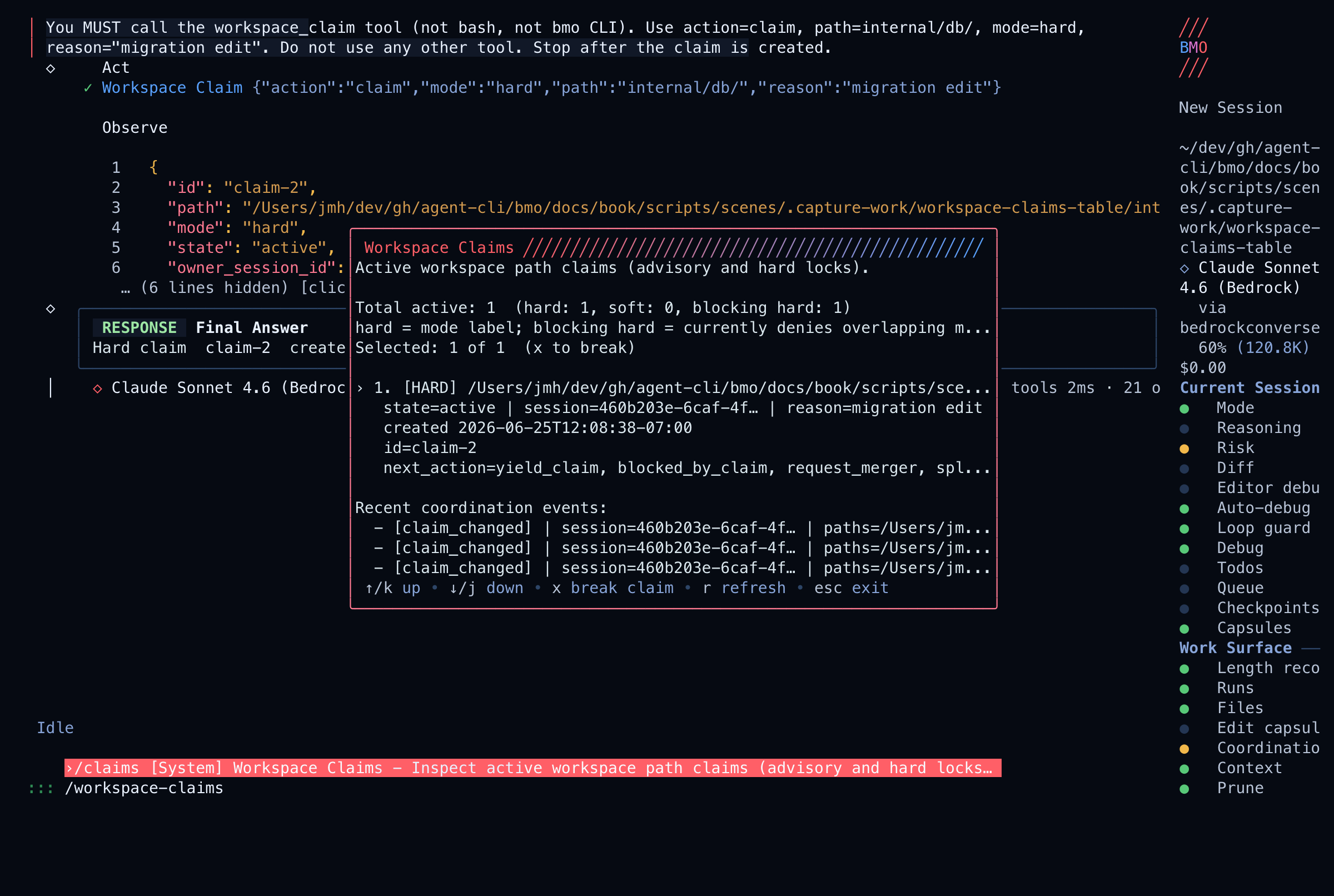
Claims are path-scoped. If the overlap is semantic rather than path-local, split the scope, request a merger, or use isolated worktrees.
Package a factory-shaped run
Section titled “Package a factory-shaped run”When a multi-agent workflow needs to be evaluated after the fact, bind it to a workstream and package the evidence. A defensible factory-shaped run records:
- the workstream id and plan or recipe;
- the parent session and delegated lanes;
- workspace claims or worktree posture when shared mutation risk exists;
- review findings, verification results, and residual work;
- whether remote output was applied locally or remains a proposal.
Use a team
Section titled “Use a team”For longer-lived coordination, ask BMO to create a team inside the run:
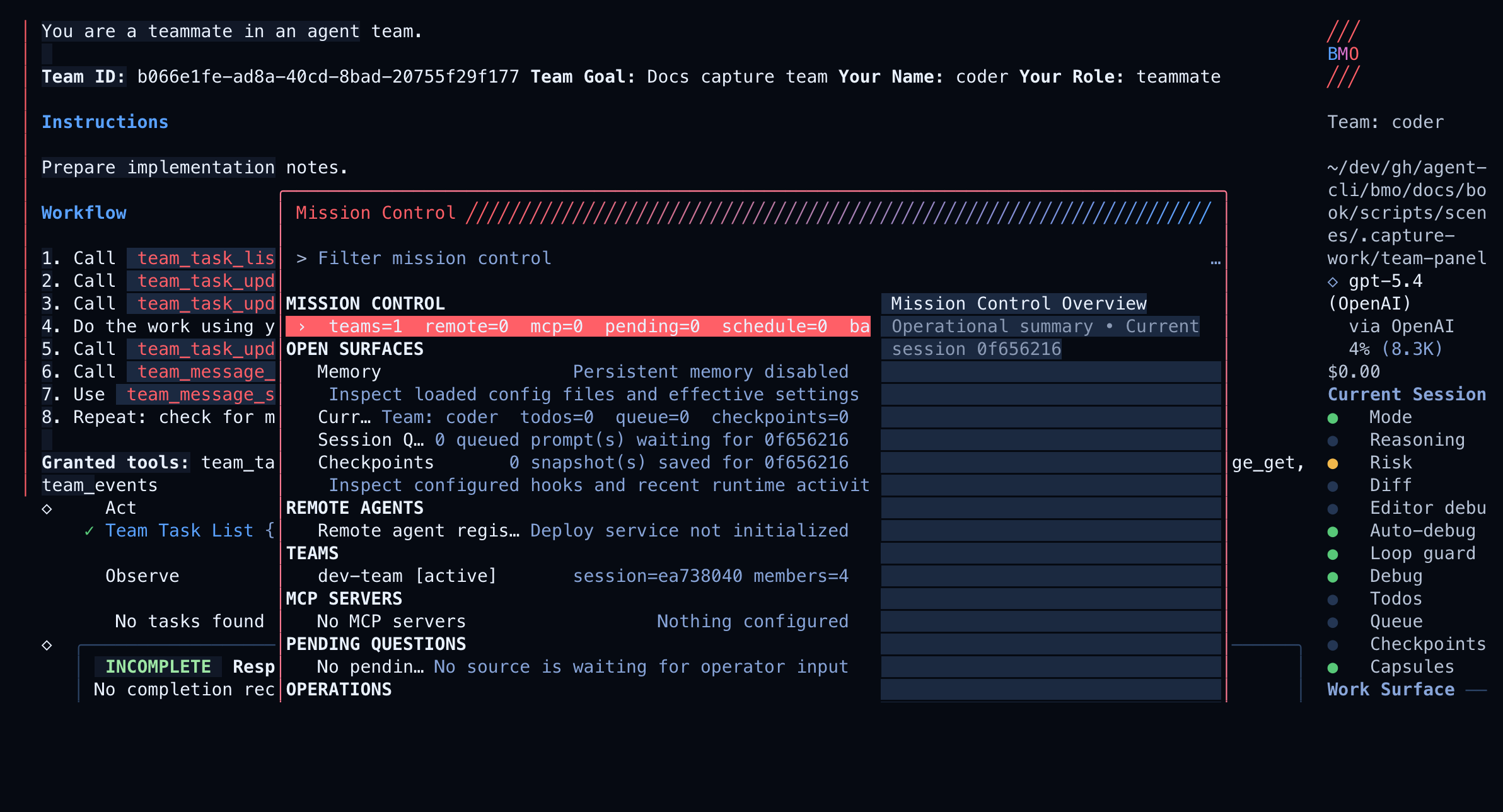
Create a team called "dev-team" with this goal:- planner: design the migration- coder: implement the code changes- reviewer: review the final diffUse /team in the TUI to monitor the team and background CSV jobs. If you need
to point BMO at a remote team backend, configure [options.teams] with
server_url and token.
What you should see: Each team member appears in the /team panel with its role and current status.
Recovery: To stop a team, press esc or close the session. Team state is session-scoped and does not persist after the session ends.
Isolated worktrees
Section titled “Isolated worktrees”For agents that must not conflict on the filesystem, ask BMO to spawn them with
worktree=true, or set the default on the task agent:
[agents.task.delegation]worktree_isolation = trueworktree_auto_remove = falseEach sub-agent gets its own git worktree. See Worktree Isolation for merge strategies.
Verify it worked: Run git worktree list to see active worktrees created by sub-agents.
Recovery: If worktrees are left behind after a crash, remove them with git worktree remove <path> or git worktree prune. Set worktree_auto_remove = true to have BMO clean them up automatically.
Remote agents (mesh and A2A)
Section titled “Remote agents (mesh and A2A)”Use sub-agents, teams, and CSV fan-out when work stays inside one BMO session. Use Agent mesh + A2A when a remote A2A peer should run the task:
mesh_resolve— list candidates for a capability (discovery only).invoke_a2a— resolve (when needed) and run the remote task.orchestrate_workflow/execute_dag— ordered multi-remote graphs;input-requiredon a node pauses until you continue that task.
Which surface to use when (spawn vs mesh vs nanite vs automation): maintainer multi-agent orchestration surface.
Constraints
Section titled “Constraints”- Spawn depth:
options.agent_max_depth(default1= one hop root → child). Per-agent[agents.<id>.delegation].max_depthtightens and is clamped to global. Global0resets to default; per-agent0disables spawning for that agent.-1disables spawns. See Multi-Agent — Spawn depth and maintainerspawning.md. - Concurrency:
options.agent_max_threadscaps parallel siblings; nanites usenanite_max_threadsseparately. - Agents share the same provider config and model settings as the parent unless overridden
- CSV fan-out workers report structured results via
report_agent_job_result