
Apple Messages through Infobip (reference)
BMO can receive Apple Messages for Business traffic through Infobip and route it into the gateway service. Infobip is a reference runtime path for teams that already have approved Infobip Apple Messages access; Bird is the active MSP proof lane for new sandbox work and remains capture-gated until live Bird send behavior is verified. This is for approved Apple Messages for Business channels only. BMO does not connect to consumer iMessage, Apple IDs, iCloud relay services, or Mac Messages automation.
Use this integration when you already have an Apple Messages for Business entry point and an Infobip sender/channel approved for that entry point. BMO owns the local gateway process, webhook normalization, session routing, and reply calls; Apple and Infobip own business onboarding, sender approval, and provider delivery.
For new MSP evaluation, start with the Bird capture workflow in the Apple
Messages gateway runbook. Keep provider = "bird" out of runtime gateway
configuration until the Bird outbound send contract is proven in the workspace.
How traffic flows
Section titled “How traffic flows”- A user starts a conversation from an approved Apple Messages entry point.
- Apple routes the business conversation to Infobip.
- Infobip calls BMO’s Apple Messages webhook.
- BMO normalizes the provider payload into a gateway message and routes it to Chat mode.
- BMO replies through Infobip using the provider conversation ID.
The gateway stores only the session routing state it needs. Capture evidence is redacted by default: raw message text, source IDs, destination IDs, API keys, sender IDs, webhook secrets, and provider conversation ID values are not shown in the visual evidence.
Requirements
Section titled “Requirements”- An approved Apple Messages for Business account and entry point.
- An Infobip Apple Messages sender/channel connected to that entry point.
- A BMO host reachable by Infobip over HTTPS.
- A shared webhook secret that Infobip sends as
X-BMO-Gateway-Secret. - An Infobip API key and sender ID for outbound replies.
For local or sandbox testing, use a short-lived HTTPS host and keep credentials out of user data, logs, and screenshots.
Configure BMO
Section titled “Configure BMO”Configure the gateway service in bmo.toml:
[services.gateway]enabled = truelisten = "127.0.0.1:8081"
[services.gateway.apple_messages]enabled = trueprovider = "infobip"
[services.gateway.apple_messages.infobip]webhook_listen = "127.0.0.1:8091"webhook_path = "/gateway/apple-messages/infobip"webhook_secret = "env:BMO_INFOBIP_WEBHOOK_SECRET"api_key = "env:BMO_INFOBIP_API_KEY"base_url = "https://api.infobip.com"sender_id = "env:BMO_INFOBIP_SENDER_ID"
Keep secrets in the environment or a credential store. The service config reads
the env: values when the gateway starts. The live capture and send tasks read
the same shell environment when you run them from the BMO repository root. Do
not commit webhook secrets, API keys, sender IDs, or conversation IDs into
project files.
Start the gateway
Section titled “Start the gateway”Check local posture first:
bmo service status gatewayStart the gateway:
bmo service start gatewayExpose the Infobip webhook path through your HTTPS ingress:
https://amb-sandbox.example.com/gateway/apple-messages/infobipProxy that public path to the configured local webhook_listen
(127.0.0.1:8091 in the example above). Configure Infobip to send POST
webhook requests with JSON payloads to that URL for Apple Messages message and
conversation lifecycle events. Include the shared secret as:
X-BMO-Gateway-Secret: <your-webhook-secret>BMO compares that header to services.gateway.apple_messages.infobip.webhook_secret
and rejects mismatches with 401. If you use a sandbox host, terminate it when
the test is complete.
Capture live evidence
Section titled “Capture live evidence”Before sending a reply smoke test, capture one real inbound webhook. The gateway logs structured records for every accepted webhook; in production you can scrape those records, or use the maintainer reference workflow (see Reference verification workflow below) to write a redacted capture artifact for visual review.
Send a live reply
Section titled “Send a live reply”After you have a captured conversation ID, send a guarded reply smoke. In
production this is one Infobip API POST against the conversation ID using
your sender ID and API key. The maintainer reference workflow at the end of
this page packages that call as a task lane for adopters who clone the
BMO source.
Operational guardrails
Section titled “Operational guardrails”- Use Apple-approved entry points only.
- Keep consumer iMessage, Apple ID relay, and Mac Messages automation out of scope.
- Keep webhook secrets and Infobip credentials out of screenshots and logs.
- Treat
/healthas process liveness only. Usebmo service status gatewayfor local configuration and store posture. - Run live provider tests manually. They are not part of the default test suite because they depend on external credentials, provider state, and approved Apple/Infobip configuration.
Reference verification workflow
Section titled “Reference verification workflow”This section is for adopters who clone the BMO source repository to verify the Infobip integration end-to-end before deploying. Production integrators do not need this section: the live integration path is the gateway service configured above plus standard Infobip webhook delivery and API calls.
The reference workflow packages capture, visual evidence, and a guarded
reply smoke for maintainers with a BMO source clone. Those checks read the same
BMO_INFOBIP_* environment variables you configure for the gateway service and
write their evidence under the repository’s provider reports directory.
The guarded send check requires BMO_INFOBIP_BASE_URL, BMO_INFOBIP_API_KEY,
BMO_INFOBIP_SENDER_ID, and either BMO_INFOBIP_CONVERSATION_ID or the latest
capture artifact. Set BMO_INFOBIP_SEND_TEXT for specific smoke-test text;
otherwise BMO uses a timestamped string.
The PNG below is a sample live capture visual rendered through Playwright’s iPhone device emulation from a redacted Infobip capture artifact:
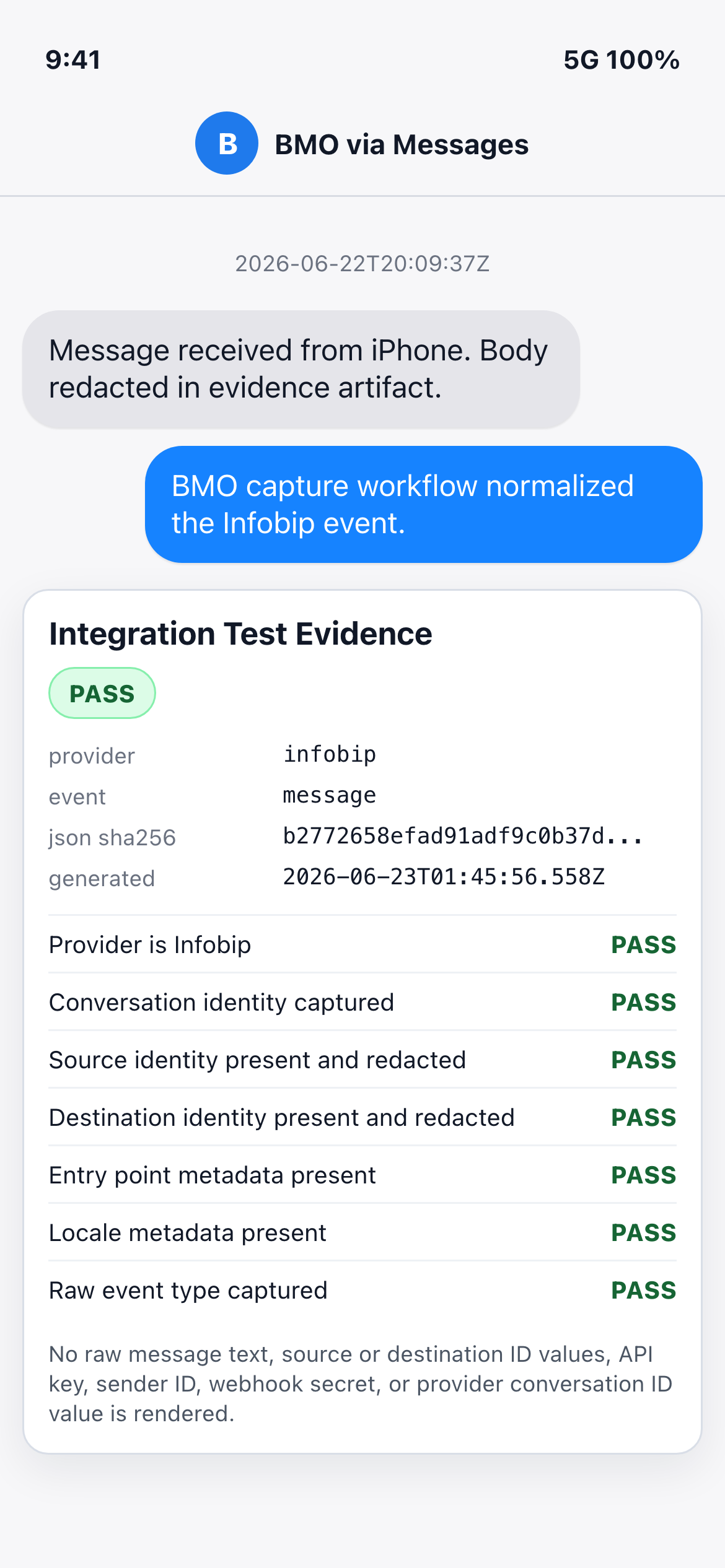
The visual confirms the integration path without exposing customer message
content or provider identifiers. The JSON artifact retains the Infobip
conversationId so the reply smoke can target the same conversation; the
rendered PNG reports only that the conversation identity was present.
Keep the reply smoke as a single guarded send per captured conversation unless you have provider approval for load testing; repeated sends can trigger Infobip throttling or policy controls.