
Adaptive orchestration
Adaptive orchestration is a default-on layer that lets BMO reshape how a session is coordinated without changing the underlying task you asked for. It is about coordination intent: choreography preset, topology, conflict strategy, isolation, coordinator style, edit-tool preference, and the opt-in model gene.
It is separate from Adaptive Context, which changes which context gets injected into a turn. Adaptive orchestration changes the set of coordination settings — preset, topology, isolation, style, edit-tool preference, and model slot hints — that shape how a run is coordinated. BMO calls this combined settings bundle the coordination genome.
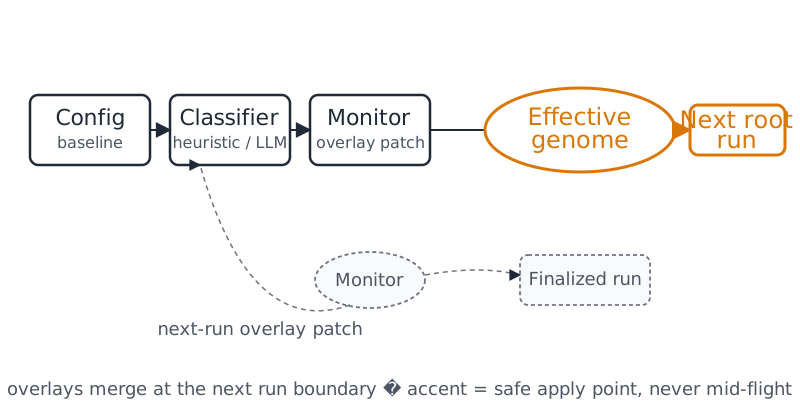
flowchart LR
    config["Config baseline"] --> merge["Merge effective coordination genome"]
    classifier["Goal classifier"] --> merge
    overlay["Monitor overlay from previous finalized run"] --> merge
    merge --> run["Current root run"]
    run --> trace["Prompt trace + status summary"]
    run --> monitor["Monitor evaluates finalized run"]
    monitor --> next["Next-run overlay patch"]
    classifier:::manual
    next:::unknown
    classDef manual stroke-dasharray:6 3
    classDef unknown stroke-dasharray:2 2,opacity:0.85
When to use it
Section titled “When to use it”Use adaptive orchestration when you want BMO to choose better coordination shapes for different kinds of work, for example:
- staying lightweight for simple edits
- shifting toward more structured coordination for broader tasks
- reacting to token pressure or other monitor signals between root runs
- downgrading from an expensive planning model to the small model slot after a task shifts into mechanical implementation, when the model gene is enabled
Enable and merge order
Section titled “Enable and merge order”Adaptive orchestration is enabled when the config section or enabled field is
omitted. Set enabled = false in bmo.toml or another merged config layer to
disable it. See Configuration for the full field
reference.
[options.adaptive_orchestration]enabled = true
[options.adaptive_orchestration.default]choreography_preset = "modal"# topology, conflict_strategy, isolation, coordinator_style,# edit_tool_preference, and model optional
[options.adaptive_orchestration.classifier]mode = "heuristic" # default; "llm" enables one bounded classifier call per session
[options.adaptive_orchestration.monitor]# Cumulative run tokens (input+output+cache) before token-pressure reshapes; 0 = offsoft_total_token_budget = 0# Optional: also evaluate the monitor after every N tool completions in the root run (0 = finalize only)# monitor_evaluate_every_n_tool_events = 0# Optional read-only hints (arena friction, eval-shadow aggregates); see monitor topic doc# hints_arena_enabled = false# hints_eval_shadow_enabled = false
[options.adaptive_orchestration.model_gene]# Opt-in: monitor may set model = "small" after planning turns become mechanical.enabled = false
Ordinary orchestration, typed routing, and passive models
Section titled “Ordinary orchestration, typed routing, and passive models”This page is ordinary adaptive orchestration: the config baseline, the heuristic or bounded LLM genome classifier, and the monitor. Two other topology paths stay off this route.
- Active typed topology asks one owner-bound Choice (
single,team_star,fan_out, orno_match) only whenoptions.adaptive_orchestration.classifier.typed_topology_enabledis true andclassifier.modeisllm. It defaults to off. A proposed answer can set the classifier topology. It does not grant tools or replace the monitor. See Typed topology. - Passive decision models, below, compare retained typed results with the heuristic classifier. They do not admit a live route. Partial App evidence abstains without calling a native model.
Passive decision-model evaluation
Section titled “Passive decision-model evaluation”Native decision models have a separate, passive Choice contract. They can
propose single, team_star, fan_out, or no_match while the existing
classifier continues to control routing. Model confidence cannot grant
permissions, spend budgets, satisfy verification, or accept completion.
Use the offline replay command to compare retained typed results with the current heuristic classifier:
bmo eval decision-model --example > decision-corpus.jsonbmo eval decision-model decision-corpus.jsonThe example is synthetic. Replace its request and response with reviewed
fixtures for qualification; replay makes no provider call. Each fixture carries
the exact task/run/turn/attempt, input and evidence snapshot, question revision,
candidate digest and model/config provenance. The optional current request
tests changed applicability. Formats are bmo, liquid (d1-3B system_one
Choice results), and gliner (GLiNER2.5-Decide classify_text label results).
Reports preserve supplied probabilities and separately tagged provider confidence. Point choices have unknown distributions. Quality requires an oracle label and reference; calibration uses raw probabilities. Missing latency, cost and independent accepted-outcome evidence remain unknown. Reports omit input text and native response bytes. Replay is conformance evidence, not a measurement of live model benefit.
For local or hosted inference, a native bridge implements BMO’s versioned
request/response envelope through internal/decisionmodel.HTTPModel. The
bridge preserves the model’s actual typed values and echoes the submitted
X-BMO-Decision-Request-Digest header and configured provenance. The response contains version,
request_digest, provenance, choice, optional provider_confidence, and
nullable usage fields. choice contains question_id, status,
candidate_ids, optional selected, and optional probabilities.
Each distribution must cover all four candidates, including no_match.
Unknown fields, duplicate keys, trailing JSON and partial distributions are
rejected. HTTP submissions have a five-second bound and no retries or redirects.
Live passive experiments require the existing runtime owner’s admission, funding settlement, cancellation and current-evidence callbacks. BMO’s ordinary App ingress currently supplies partial evidence and therefore abstains without calling a native model. There is no automatic activation setting.
The native translator shapes follow the Liquid model card and GLiNER model card.
How it works
Section titled “How it works”- The config baseline provides the default coordination genome (the starting set of coordination settings).
- The optional classifier contributes a bounded patch based on the task.
- The monitor can reshape the in-memory session overlay after a finalized root run.
- The optional model gene lets the monitor record a next-run model hint, currently a one-way downgrade to the small model slot after a task-complexity drop.
- If a reshape changes choreography preset, BMO applies it at the next root run boundary, not in the middle of a live run. Model-gene changes follow the same next-boundary posture.
By default, the monitor evaluates at run finalization. When
monitor_evaluate_every_n_tool_events is positive, the same evaluation can run
on a background worker every N tool completions in the root run.
sequenceDiagram
    participant User
    participant Classifier
    participant Shaper
    participant RunCoordinator
    participant Monitor
    participant Overlay as NextRunOverlay

    User->>Classifier: session goal
    Classifier->>Shaper: bounded genome patch
    Shaper->>RunCoordinator: effective coordination genome
    RunCoordinator->>RunCoordinator: root run executes
    Note over RunCoordinator: live run is never mutated mid-flight
    RunCoordinator->>Monitor: finalize run telemetry
    Monitor->>Overlay: schedule overlay patch
    Overlay-->>RunCoordinator: apply at next root run boundary
Observability
Section titled “Observability”You can toggle this feature in the TUI via /settings (or /config) →
Advanced → Adaptive orchestration. That toggle writes
options.adaptive_orchestration.enabled and applies to new runs immediately.
When enabled, the prompt trace includes an adaptive_orchestration segment with metadata such as effective_genome, classification_source (config_baseline, heuristic, llm, llm_fallback_heuristic, llm_fallback_baseline, …), last_reshape_reason, last_reshape_signal_id, whether the reshaped runtime apply is still pending, and whether the model gene has already applied in the session.
You can view this trace in the TUI by opening the Agent Debugger (/debug or ctrl+p → Debugger), selecting a run, and looking at the prompt event metadata.
The main TUI also shows a compact adaptive orchestration summary in the status bar for the current session, so you can see the effective preset, active model gene, latest reshape hint, and whether the next-run apply is still pending without opening the debugger.
When enabled, you can inspect the live state through:
bmo config show-adaptive-orchestrationfor headless effective-config posture and canonical readout surfacesget_adaptive_orchestrationorbmo_get_adaptive_orchestrationfor live session parity JSONGET /v1/sessions/{id}/adaptive-orchestrationfor HTTP parity; bound callers reuse the current trusted session- Agent Debugger prompt metadata
- the status bar summary for the current session
- the parity surfaces documented in Adaptive orchestration parity
All readouts use the same posture vocabulary: disabled, unavailable,
enabled-idle, active, pending-apply, applied, degraded, and
unknown. Posture evidence is metadata-only and does not expose raw prompts,
tool bodies, model responses, or full regulatory digests.
stateDiagram-v2
    [*] --> disabled: feature off
    disabled --> enabledIdle: enabled, no session evidence
    enabledIdle --> active: genome or monitor evidence
    active --> pendingApply: reshape scheduled
    pendingApply --> applied: next boundary apply
    applied --> active: further evaluations
    active --> degraded: bounded failure recorded
    degraded --> active: recovery
    enabledIdle --> unknown: no snapshot
    active --> unknown: evidence missing
    unknown --> enabledIdle: snapshot available
Related: layered regulation and precedence
Section titled “Related: layered regulation and precedence”Adaptive orchestration is only one layer in BMO’s regulation model. Mesh, health follow-ons, workspace observation, and choreography also contribute runtime behavior, but they do not all own the same state.
Start with How BMO thinks and acts if you want the user-facing overview.
For contributors: Deep precedence rules across regulation layers are documented in the repository topic
ai-organism-constitution.md.
Related
Section titled “Related”For contributors: Classifier design and monitor signal details are covered in the repository topic
docs/topics/orchestration/adaptive.md.
Live, proof-based visuals
Section titled “Live, proof-based visuals”These three panels are not illustrations. Their values are captured verbatim
from the surfaces BMO actually exposes and are regenerated and drift-checked
(run task docs:capture:adaptive-orchestration),
so this page cannot quietly drift from the product. On the web they are
interactive; in the PDF/book they show the same captured state statically.
Proof · Real · it ships and is inspectable
Captured verbatim from bmo config show-adaptive-orchestration --json — the same readout you get in the product.
state:                       enabled-idle
classifier_mode:             heuristic
default_choreography_preset: modal
monitor_soft_token_budget:   120000
model_gene_enabled:          true
Session posture — real captured snapshots
bmo-demo/docs/demo/evidence/adaptive-orchestration/status-readout.json + posture-snapshots.json.Proof · Mechanism · how a run gets shaped
The effective coordination genome is the same MergeSession overlay the coordinator runs: config baseline, then the classifier patch, then the monitor overlay.
Config baseline genome (default coordination settings).
Heuristic classifier shifts a broad task toward structured coordination.
Monitor records an opt-in model downgrade after the task becomes mechanical.
bmo-demo/docs/demo/evidence/adaptive-orchestration/prompt-trace-segment.json (merge_trace), built with the real orchadaptive.MergeSession.Proof · Bounded · never mutates a live run
A monitor reshape is recorded, then waits. The runtime apply lands at the next root-run boundary — it never rewrites a run in flight.
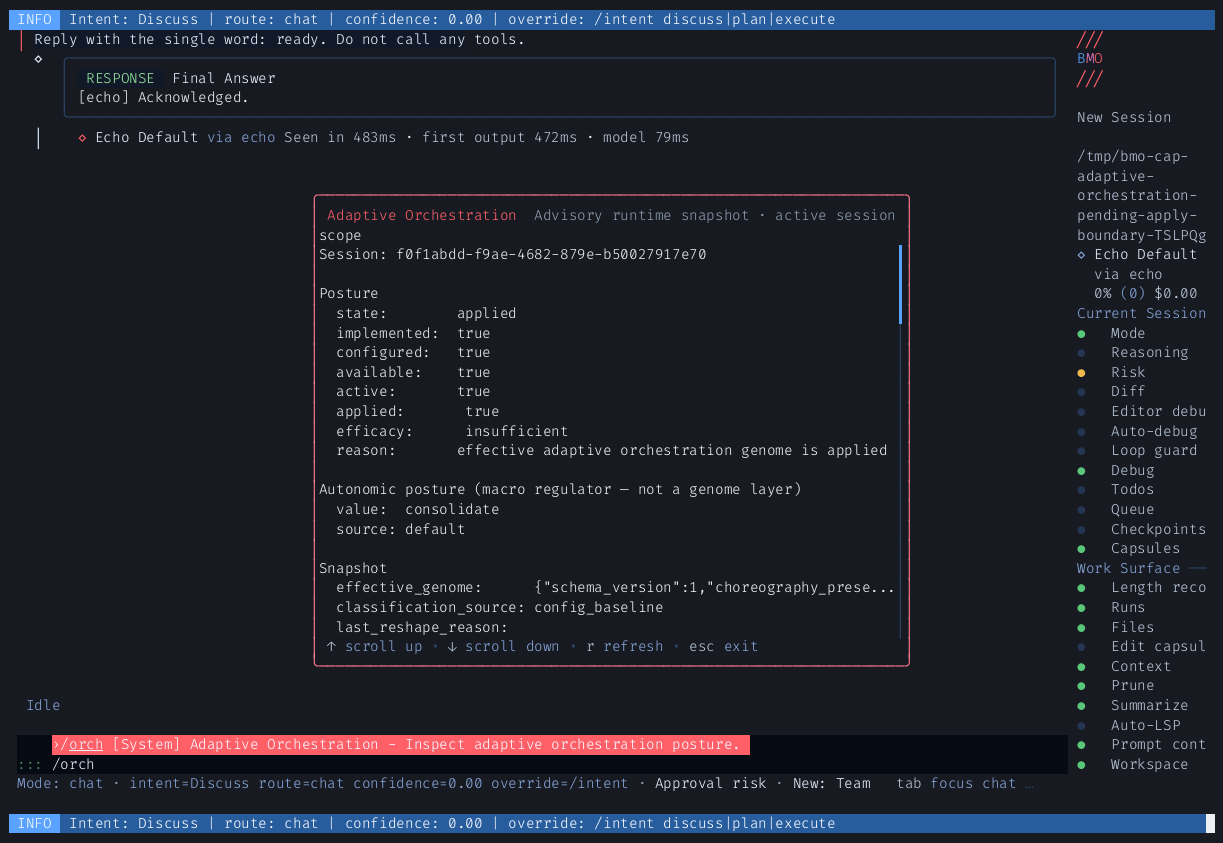
posture-snapshots.json; adaptive orchestration is an overlay stack, not an unbounded rewrite of the task.