
Overview
BMO is a terminal coding agent. Describe a task; BMO reads your repo, edits files, and runs commands under the configured session mode, tool policy, and permission grants.
Start here: interactive TUI or bmo run, shared local session state,
policy-controlled tools, and inspectable run history.
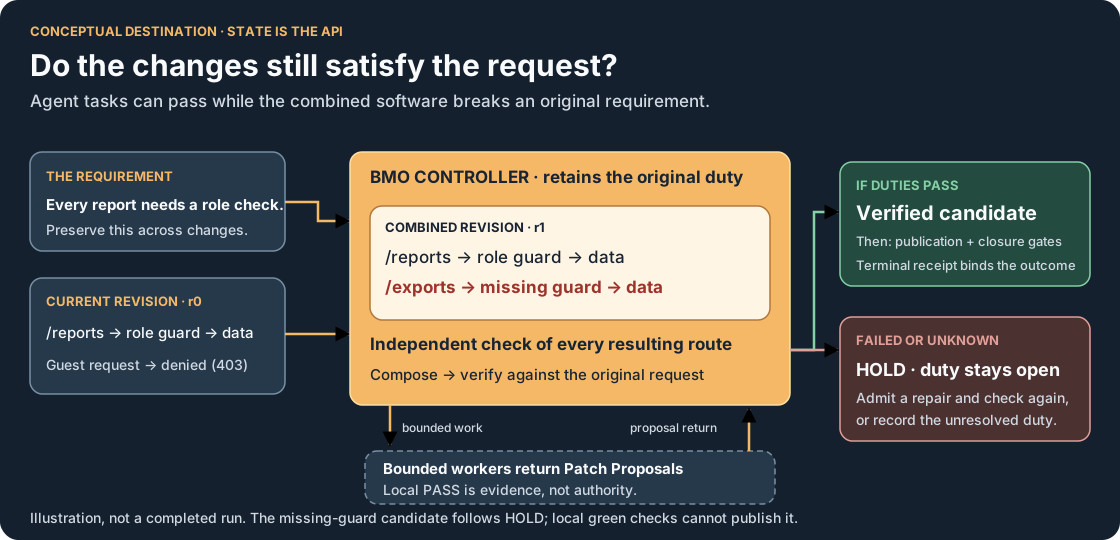
The conceptual system map illustrates a broader proposed synthesis loop: checking combined changes against the original requirements. The proof gallery separates that concept from recorded scenarios and their evidence limits.
Opt-in / advanced: sub-agents, workspace claims, mesh delegation, workstreams, and signal coordination.
Release compatibility: CLI and on-disk formats can change between release lines. BWO stable v2.1.0 provides BMO binary builds for authorized repository readers; preview and nightly remain empty. Follow the version-specific installation notes.
Agent-native architecture means BMO is built around agents as first-class operators, not as a separate chat interface. The agent can inspect workspace state, choose tools, coordinate workflows, preserve context, and expose what it is doing through the TUI, CLI, and server surfaces. The goal is not unchecked autonomy; it is visible, interruptible, recoverable intelligent work.
New here?
Section titled “New here?”Start with Quickstart — install, first prompt, first edit, and enough mental model to keep going in one short page. Then use the routing table below.
Who this is for
Section titled “Who this is for”| Reader | Start here | BMO’s fit |
|---|---|---|
| Solo developer | Quickstart | Terminal agent with review gates |
| Team lead | Authentication, Configuration | Shared policy surfaces; local-first |
| Platform / DevOps | Automation & Headless Mode | Headless runs, loopback/token auth patterns |
| Maintainer | About This Book | Full reference and contracts |
See About This Book for the full path matrix.
How this book is organized
Section titled “How this book is organized”Guide layer — Get Started and Guides: install, first run, mental model, concept map, and everyday workflows. Read in order when you’re new.
Concept family layer — Core Concepts, Sessions & Continuity, Workflows & Decision Forums, Context & Workspace Intelligence, Trust, Evidence & Recovery, and Editing & Code Change Tools. Use Concept Map when you know the problem shape before you know the feature name.
Reference layer — Integrations, Reference, Advanced, Resources, and Appendices: every protocol, config key, command, and support surface. Search when you know what you need.
What makes BMO different
Section titled “What makes BMO different”

ALTERNATIVES STUDY / EQUAL STATUS


TRACE STUDY / CHECKOUT
- Shared workspace instead of isolated chat. You and the agent operate against the same session state, message history, tools, and data directory.
- Explicit actions instead of hidden magic. File reads, edits, shell execution, remote delegation, and scheduled jobs happen through named capabilities (Tools Reference).
- Composable workflows. Staged workflow, recipes, autopilot, schedules, and compaction build on those same surfaces; mesh and advanced coordination are opt-in.
- Coherence under parallelism (advanced). Workspace claims, workstreams, and verification make parallel agent work inspectable — not automatic on day one.
- Multiple operator surfaces.
bmo(TUI),bmo run,bmo service,bmo acp, and A2A HTTP reuse the same agent core with surface-specific policy UX.
Runtime surfaces at a glance
Section titled “Runtime surfaces at a glance”Choose the surface by ownership model:
- Interactive local TUI: run
bmowhen you want the current terminal to own rendering and the full runtime. - Reuse an already-running local daemon: run
bmo --daemon=autoorbmo --daemon=requirewhen a compatible loopback runtime should keep session authority while the terminal acts as an attached client. - Expose an API: run
bmo service start httpwhen you need HTTP/SSE integration without the scheduler. - Keep a headless long-lived runtime up: run
bmo service start autopilotwhen you want the HTTP server and scheduler in one daemon-owned process.
The HTTP server and autopilot are operator-facing service modes. Attached TUI reuse is a local loopback optimization for a daemon you already trust, not a separate remote collaboration model.
Common evaluation questions
Section titled “Common evaluation questions”| Question | BMO’s answer |
|---|---|
| What keeps an agent’s edits reviewable? | Session modes, tool policy, and existing grants determine whether a tool is allowed, denied, or asks for approval. bmo run accepts --auto-approve-tools; global -y skips permission prompts. See Automation & Headless Mode before widening in CI. |
| Can I run against my real repository? | Yes. Default options.sandbox.backend = local runs on the host. Select docker, ssh, or buildkit in bmo.toml for a different execution boundary; check the backend’s configuration and limits. See Execution Sandbox and Security posture. |
| What stops parallel agents from clobbering files? | Workspace claims (hard or soft, process-local) record path intent; hard claims block overlapping BMO mutation tools in the same process. Claims are not filesystem locks. Mesh routes remote agents by capability — it does not replace claims. The multiplayer coordination dashboard is a read-only observability hub, not a pre-write conflict gate. |
| How do I plug BMO into my stack? | One agent core, many surfaces: bmo (TUI), bmo run, `bmo service start http |
| Can I audit runs after the fact? | Sessions, tool calls, approvals, and evidence persist to the data dir. Inspect with bmo session list, bmo session status --session <id>, and TUI /debugger or /runs. |
Before you commit: BMO is free; you pay provider API usage (BYOK). Pin release tags for stability-sensitive use. See FAQ.
Is BMO a good fit?
Section titled “Is BMO a good fit?”BMO is built for a specific posture. It fits well when:
- You work primarily in a terminal and want the agent to operate on your real local repository (not a separate hosted copy).
- You want editor agent integration for Zed-style IDEs via ACP
(
bmo acp) and/or MCP context tools, still against that same checkout — see Zed and Cursor and IDEs. - You want review gates by default — risky tools prompt for approval, and you widen policy deliberately rather than starting fully autonomous.
- You value local-first, inspectable state: shared session, durable run evidence, and a data directory you own.
- You want one agent core across surfaces (TUI,
bmo run, HTTP/MCP/ACP servers) instead of separate tools per surface.
It is a weaker fit when:
- You want a hands-off autonomous agent with no approval surface — BMO’s design intentionally keeps work visible, interruptible, and recoverable.
- You need a turnkey hosted web IDE product (BMO is not that). Prefer an editor-native hosted IDE when that is the whole product you want; BMO’s IDE path is local ACP/MCP integration, not a hosted web workspace.
- You cannot bring your own provider key, or you need a turnkey managed service rather than a release binary you run yourself.
Choose the right starting point
Section titled “Choose the right starting point”| I want to… | Go to |
|---|---|
| Take the shortest first-run path | Quickstart |
| Install and run BMO | Installation |
| Set up provider auth | Authentication |
| Understand the mental model before going deep | How BMO thinks and acts |
| Pick the right concept family before browsing features | Concept Map |
| See how prompts turn into tools and workflows | Workflow map |
| Learn how the book is organized | About This Book |
| Discover capabilities from inside the product | How to discover what BMO can do |
| Learn practical day-to-day prompting patterns | Common Workflows |
| Understand tool and config surfaces | Tools Reference and Configuration |
| Run BMO without the TUI | Automation & Headless Mode |
| Coordinate multiple or remote agents | Multi-Agent Workflows and Agent Mesh |