
Shadow Evals
Where this fits
Section titled “Where this fits”Shadow Evals are the across-sessions measurement surface in the conversation quality lifecycle. They capture eligible real work, replay variants offline, and expose bounded posture for maintainers — without changing live assistant output.
Changes live output?
Section titled “Changes live output?”No. Shadow evals never re-rank the live response and never auto-promote
a model or prompt. Arena eval_shadow auto-select is a separate, opt-in arena
policy — not proposal promotion.
Reach for it when
Section titled “Reach for it when”You changed prompts, routing, providers, or scenarios and need deterministic before/after evidence plus optional shadow replay scorecards before trusting a change.
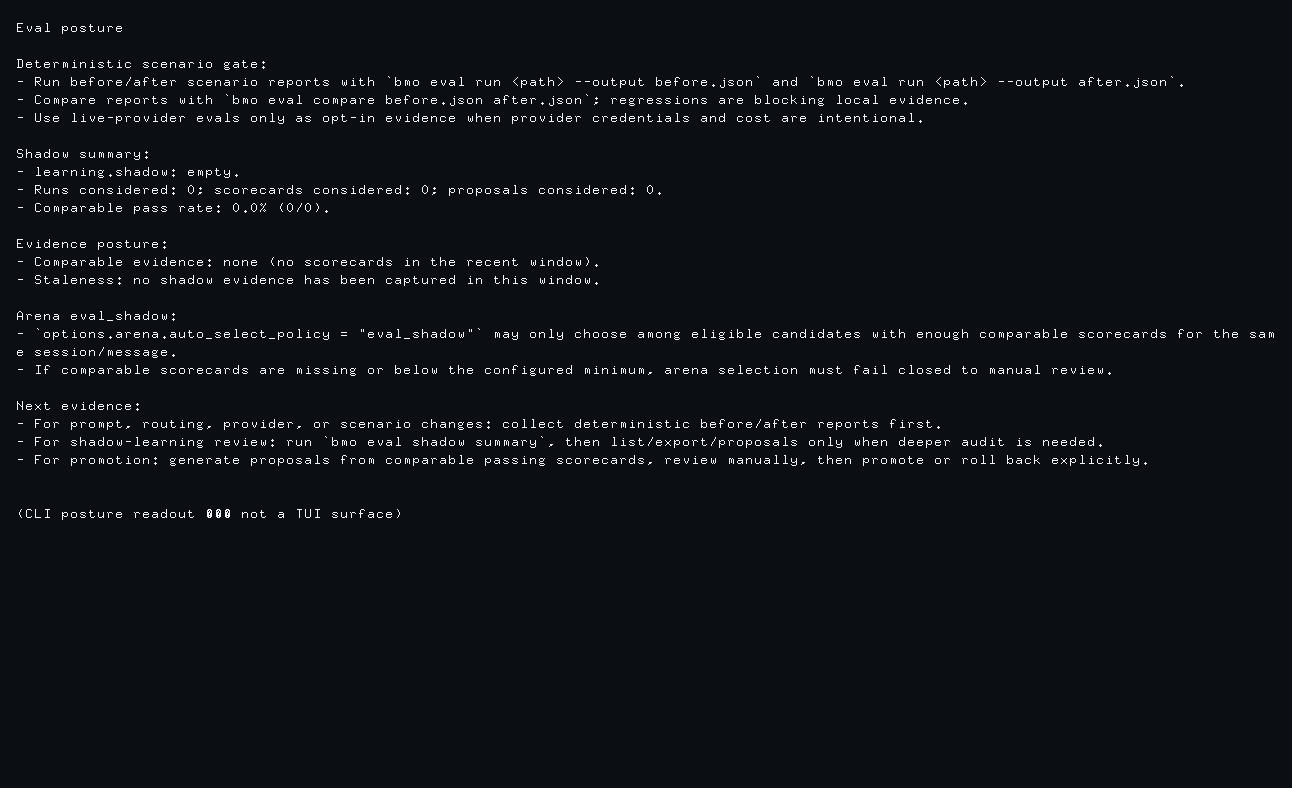
Inspect
Section titled “Inspect”| Job | Route | What it shows |
|---|---|---|
| Maintainer gate | bmo eval posture [--json] | Deterministic eval gates, shadow summary health, proposal state, arena eval_shadow readiness |
| Bounded summary | bmo eval shadow summary, eval_shadow_summary, GET /v1/eval/shadow/summary | Same bounded posture block as eval posture |
| Deep audit | bmo eval shadow list, show, export | Artifacts, scorecards, comparability state |
Related quality surfaces
Section titled “Related quality surfaces”- Conversation quality — step 4 of the infra regression walkthrough
- Prompt Stack — inspect what was assembled when shadow artifacts include prompt-trace segments
- Quality Gates —
bmo quality-gate checkon recipes complements eval compare; different command family
Deep dive
Section titled “Deep dive”Shadow evals let BMO capture eligible real runs, replay them in the background against one or more configured variants, and store the outcomes for later comparison. You can then generate proposals from comparable scorecards, decide (accept, reject, defer), and promote accepted proposals to promoted assets with stable target refs. Rollback is supported and auditable.
These proposals are learning/promotion records. They are separate from Patch Proposals, which review and optionally apply agent-produced code changes.
Arena auto-select (eval_shadow)
Section titled “Arena auto-select (eval_shadow)”Optional Arena policy: with
options.arena.auto_select_policy = "eval_shadow", BMO can pick a winner after a
standalone arena round using shadow scorecards for that session and user
message. Full walkthrough and status capture live on the
Arena feature page. This is separate from proposal
promotion. Requires shadow capture/replay and matching candidate_model keys.
See arena topic for eligibility and tie-break rules.
What gets captured
Section titled “What gets captured”In the current runtime, automatic capture is limited to top-level runs from the normal app/session path. It excludes child-agent subruns and protocol surfaces such as A2A and gateway traffic.
Each captured artifact stores:
- The original prompt snapshot
- Prompt-trace segments from the run
- The baseline response
- Tool-call observations from the baseline run
- Read-file snapshots and latest file snapshots from the workspace
- Validation rules derived from the baseline run
If BMO cannot capture a safe, replayable artifact, it stores the artifact as
non-replayable and does not queue shadow runs. This fail-closed path is used
when prompt trace is missing, read snapshots are unavailable, captured paths
fall outside the configured working directory, or the capture exceeds the size
limit. Each artifact records a structured capture reason (e.g. no_read_snapshots,
capture_over_bytes) for inspection and policy compliance.
Capture can be constrained by scope policy: allow/deny lists for repo path
(working directory), session ID, and task class. When an allow list is set,
only matching runs are captured; when a deny list is set, matching runs are
excluded. See the configuration reference for allow_repos, deny_repos,
allow_sessions, deny_sessions, allow_task_classes, and deny_task_classes.
How replay works
Section titled “How replay works”When an artifact is replayable, BMO enqueues one replay run per configured variant.
If learning.shadow.enabled = true but no [[learning.shadow.variants]]
entries are configured, BMO may capture artifacts but automatic replay queues no
runs and no scorecards can be produced. bmo config check reports this as a
non-fatal warning so operators can choose capture-only mode deliberately or add
variants before expecting replay evidence.
Each replay:
- Copies the source working tree into an isolated temp directory
- Rehydrates tracked file snapshots into that temp workdir
- Runs
bmo runwith the variant’s model, prompt prefix, and optional agent override - Reuses the same validation-rule semantics as eval scenarios
- Writes a scorecard with file diffs, tool diffs, replay summary, and pass/fail status
Replay scorecards use one of three comparability states:
comparable- the replay completed cleanly and the captured evidence was sufficientdegraded- the replay completed, but evidence or workspace drift reduced confidencenon_comparable- the replay could not be compared reliably
Enable shadow evals
Section titled “Enable shadow evals”Add a learning.shadow section to your config:
[learning.shadow]enabled = truecapture_top_level_runs = truesample_rate = 1.0retention_days = 30max_capture_bytes = 1048576# Optional: restrict capture by repo path, session ID, or task class# allow_repos = ["/path/to/allowed/repo"]# deny_repos = ["/tmp"]# allow_sessions = ["sess-1"]# deny_task_classes = ["exploration"]
[[learning.shadow.variants]]name = "candidate-sonnet"model = "anthropic/claude-sonnet-4-20250514"prompt_prefix = "Prefer concise code-review style output."agent = "coder"
[[learning.shadow.variants]]name = "candidate-task"model = "openai/gpt-5"agent = "task"
Inspect results from the CLI
Section titled “Inspect results from the CLI”Use bmo eval posture first when you need a bounded maintainer readout across
deterministic eval gates, shadow summary health, proposal state, and arena
eval_shadow readiness:
# Print deterministic-first eval posture plus bounded shadow-eval healthbmo eval posture
# Emit machine-readable posture for automationbmo eval posture --json
The posture command succeeds when learning.shadow is disabled. That is the
safe opt-in state; the command reports that shadow-only evidence is unavailable
and points maintainers back to deterministic before/after reports. When
learning is enabled, the readout distinguishes empty, non-comparable, failing,
usable, stale, and degraded worker state without dumping captured prompts or
artifacts. The degraded latch is service-owned: three consecutive worker-path
failures flip the posture, and the next successful worker boundary clears it.
The JSON readout now also includes a bounded evidence verdict so automation
and review tooling can distinguish disabled, empty, stale,
non_comparable, failing, and usable shadow evidence without parsing the
human-readable text sections.
Use the bmo eval shadow commands when the posture readout says deeper audit is
needed:
# Print the bounded quality summary over recent runs, scorecards, and proposalsbmo eval shadow summary
# List recent artifacts and replay runsbmo eval shadow list
# Filter by agent type or route sourcebmo eval shadow list --agent-type coder --route-source app_run
# Show one captured artifact with linked runs and scorecardsbmo eval shadow show <artifact-id>
# Turn one artifact plus live pane proof into a reviewer-friendly evidence cardbmo eval shadow show <artifact-id> > shadow-show.jsonnode scripts/render-shadow-capture-report.mjs \  --artifact shadow-show.json \  --pane-text live-tui-pane.txt \  --pane-png live-tui-pane.png \  --output shadow-capture-report.md
# Export runs and scorecards as JSONLbmo eval shadow export --format jsonl
# Export only comparable runs for one model as CSVbmo eval shadow export --format csv --candidate-model anthropic/claude-sonnet-4-20250514 --comparability comparable
# Delete an artifact (and its runs and scorecards) or a single runbmo eval shadow delete artifact <artifact-id>bmo eval shadow delete run <run-id>
# Purge artifacts older than retention (TTL)bmo eval shadow purge --retention-days 30
bmo eval shadow summary prints the bounded quality snapshot used by the
eval_shadow_summary tool, bmo eval posture, and HTTP summary route. Its
JSON payload includes the same bounded posture block that bmo eval posture
uses for service health. Use it before list, show, or export unless you
already know which artifact or run needs inspection. bmo eval shadow show
prints one JSON document containing the artifact, its linked runs and
scorecards. Treat that JSON as raw evidence, not the primary human review
surface: when sharing a live-capture proof, render a Markdown evidence card with
scripts/render-shadow-capture-report.mjs so the prompt, tool trace, read
snapshots, scorecard, and linked pane image appear as labeled sections. Keep the
raw JSON and pane transcript linked from the report for forensic review.
bmo eval shadow export defaults to JSONL and also supports CSV. Use
bmo eval shadow delete to remove specific artifacts or runs; use bmo eval shadow purge to remove artifacts older than a retention window (manual TTL
purge; the learning worker also purges by configured retention automatically).
Maintainer evidence recipe
Section titled “Maintainer evidence recipe”For prompt, routing, arena, provider, or scenario changes, collect deterministic
evidence before leaning on shadow learning. This recipe is not bmo quality-gate check — see Quality Gates for post-draft rubrics and manual recipe hardening.
bmo eval run eval/scenarios/prompt-stack/ --output before.jsonbmo eval run eval/scenarios/prompt-stack/ --output after.jsonbmo eval compare before.json after.jsonbmo eval postureTreat bmo eval compare regressions as blocking local evidence. Treat shadow
summary state as advisory unless the bounded evidence verdict is usable,
which means comparable passing scorecards exist and the newest evidence is
still within the configured freshness window. Live-provider evals and shadow
replay remain opt-in because they depend on local credentials, provider
behavior, and intentional spend.
API surfaces
Section titled “API surfaces”If you run BMO as an HTTP server, the same data is available over JSON endpoints.
Summary
GET /v1/eval/shadow/summary— bounded eval-shadow posture (same family asbmo eval postureandeval_shadow_summary); see Eval shadow summary
Artifacts and runs
GET /v1/eval/shadow/artifacts— list artifactsGET /v1/eval/shadow/artifacts/{artifact_id}— get one artifact with runs and scorecardsDELETE /v1/eval/shadow/artifacts/{artifact_id}— delete an artifact and its runs/scorecards (204)GET /v1/eval/shadow/runs— list runs (with scorecards)DELETE /v1/eval/shadow/runs/{run_id}— delete a run and its scorecard (204)GET /v1/eval/shadow/export?format=jsonl— stream artifacts, scorecards, proposals, and promoted assets as JSONL for offline review or archival.GET /v1/eval/shadow/export?format=csv— export comparable shadow-eval rows as CSV for spreadsheet review and reporting.
Proposals and promoted assets are documented in the Proposals and Promoted assets sections above.
Common filters include limit, artifact_id, session_id, agent_type,
route_source, run_id, status, candidate_model, and comparability.
Delete endpoints return 404 when the resource is missing or the learning
service is unavailable.
Proposals (review and decide)
Section titled “Proposals (review and decide)”After you have comparable passing scorecards, you can generate proposals grouped by task class and target surface. Each proposal is a candidate for turning repeated wins into a reusable asset (e.g. recipe, operating pack, or change contract). Proposals stay in a pending state until a human records a decision.
BMO never auto-promotes. You must:
- Generate proposals from comparable scorecards (optional; you can also create proposals manually via the API).
- Review proposal summary, evidence refs, and target surface.
- Record a decision: accepted, rejected, deferred, or rolled_back.
Proposal records are append-only audit artifacts. There is no delete/archive API or agent tool for proposals; use decisions, promotion, and rollback to advance their lifecycle while preserving history.
CLI: proposals
Section titled “CLI: proposals”# List proposals (filter by state, task class, target surface)bmo eval shadow proposals listbmo eval shadow proposals list --state pending --limit 20
# Get one proposalbmo eval shadow proposals get <proposal-id>
# Generate proposals from comparable passing scorecards (min 2 runs per group by default)bmo eval shadow proposals generatebmo eval shadow proposals generate --min-comparable-runs 3 --target-surface recipe
# Record a decision (accepted, rejected, deferred, rolled_back)bmo eval shadow proposals decide <proposal-id> --outcome accepted --reviewer "alice" --rationale "LGTM"API: proposals
Section titled “API: proposals”GET /v1/eval/shadow/proposals— list (query:limit,proposal_id,state,task_class,target_surface)GET /v1/eval/shadow/proposals/{proposal_id}— get onePOST /v1/eval/shadow/proposals/generate— generate from scorecards (body: optionalmin_comparable_runs,target_surface,task_class)POST /v1/eval/shadow/proposals/{proposal_id}/decide— record decision (body:outcome,reviewer,rationale)
Promoted assets (activate and roll back)
Section titled “Promoted assets (activate and roll back)”When a proposal is accepted, you can promote it: record a stable target ref (e.g. recipe path, pack id, contract id) and who activated it. That creates a promoted asset (derived asset) in state active. Later you can roll back an active asset; the rollback preserves the rationale and updates the proposal’s audit trail.
Promotion in BMO only records the target ref and state. It does not create or mutate recipe files, operating packs, or change contracts itself; you use other workflows to create those assets and then record the ref when promoting.
CLI: promoted assets
Section titled “CLI: promoted assets”# List promoted assets (filter by state, proposal, target type)bmo eval shadow promoted listbmo eval shadow promoted list --state active
# Get one promoted assetbmo eval shadow promoted get <asset-id>
# Promote an accepted proposal (record target ref)bmo eval shadow promoted promote <proposal-id> --target-type recipe --target-id "recipes/learned.yaml" --activated-by "alice"
# Roll back an active promoted assetbmo eval shadow promoted rollback <asset-id> --rationale "Overfit to one run"API: promoted assets
Section titled “API: promoted assets”GET /v1/eval/shadow/derived-assets— list (query:limit,asset_id,proposal_id,state,target_type)GET /v1/eval/shadow/derived-assets/{asset_id}— get onePOST /v1/eval/shadow/proposals/{proposal_id}/promote— create promoted asset from accepted proposal (body:target_type,target_id,version_ref,activated_by)POST /v1/eval/shadow/derived-assets/{asset_id}/rollback— mark asset rolled back (body:rationale)
Rollback records a decision on the underlying proposal so the full chain (proposal → promote → rollback) remains auditable.
Useful replay-related run flags
Section titled “Useful replay-related run flags”Shadow replay variants are built on top of bmo run, which supports:
--agentto override the agent used for that one run--system-prompt-prefixto prepend additional system guidance for that run
These flags are also useful for ad hoc local experiments outside the shadow worker.
Contracts and taxonomy
Section titled “Contracts and taxonomy”Task classes, capture decision reasons, provenance, proposal states, and promoted asset (derived asset) states are defined in code under internal/learning/. In-tree behavior covers capture, replay, scorecards, proposals and decisions, and promoted assets with rollback, using that taxonomy.
- Type contracts:
internal/learning/contracts.go— task classes, capture reasons, provenance, proposal and derived-asset types. - Service entry points and state transitions:
internal/learning/service.go. - Rollout, promotion, and rollback edges:
internal/learning/rollout.go.
Treat the Go source as ground truth for vocabulary; this page summarises the operator-visible behavior built on it.
Current scope
Section titled “Current scope”Shadow evals are a contributor and operator feature in the active interface.
There is no dedicated full /evals TUI pane. Use the config, CLI, and server
APIs to enable capture, inspect scorecards, and export results for offline
analysis. A compact metadata-only /eval-posture TUI slash (same contract
as bmo eval posture) is planned as follow-on work after the shared evidence
contract stabilizes — not a full artifact browser.