
Staged Workflow
Staged workflow separates planning from execution. It is a dual opt-in:
set both enabled = true and require_approval_before_execute = true. In that
mode, the agent produces a plan artifact and waits; mutation tools remain
blocked until the plan is approved.
This plan-level gate is separate from BMO’s normal per-tool confirmation policy. Outside this opt-in mode, risky tool calls still ask for confirmation by default unless you explicitly enable automatic tool approval. The staged gate controls entry to execution; it is not evidence that a particular tool call has been approved.
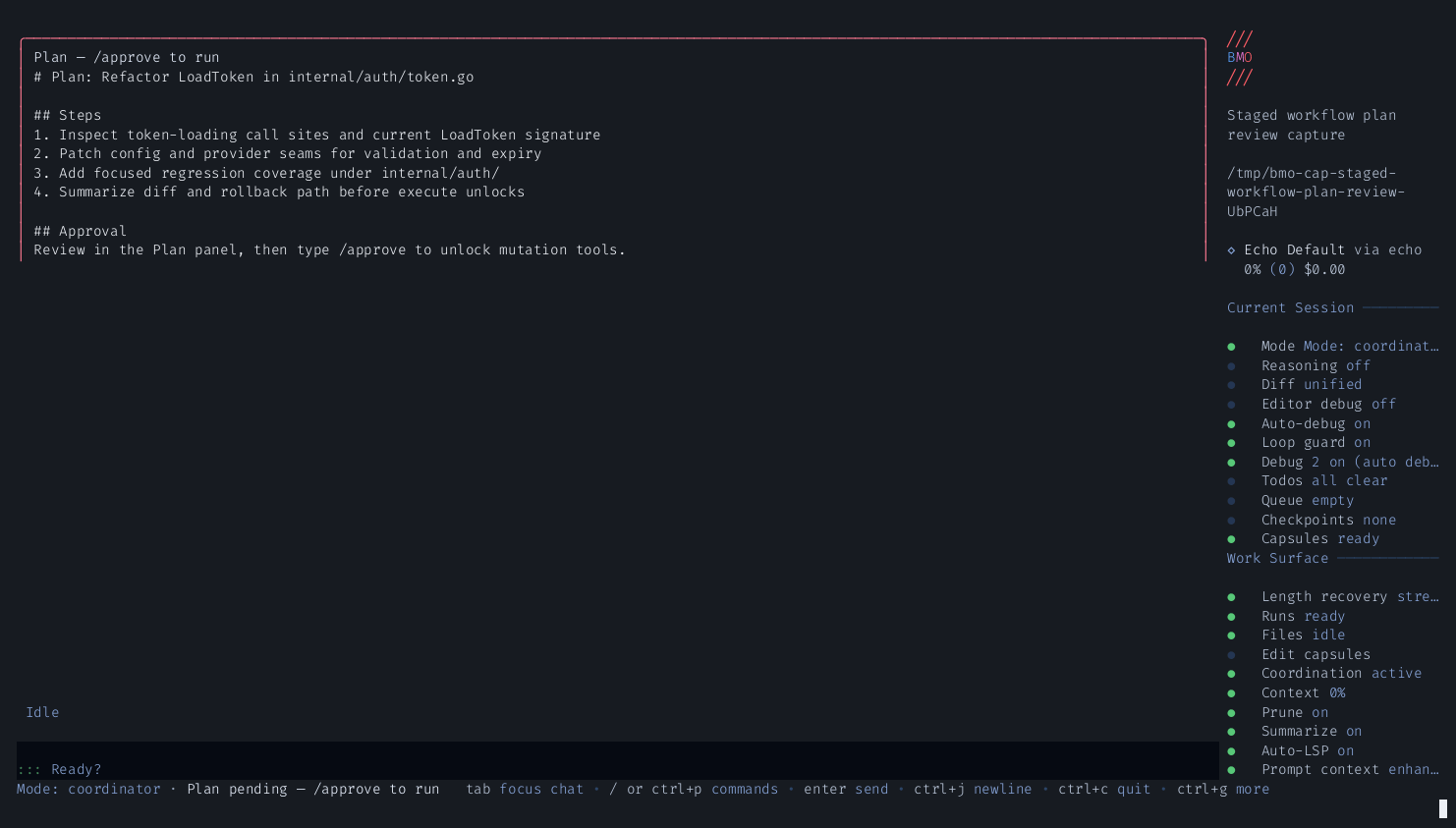
The agent stores the plan with set_plan_artifact. There is no
submit_plan tool. In the TUI, the plan appears in the upper Plan
panel (Plan — /approve to run) and the status bar (Plan pending — /approve to run).
[options.staged_workflow]enabled = truerequire_approval_before_execute = trueHow it works
Section titled “How it works”stateDiagram-v2
[*] --> Plan: request (dual opt-in gate enabled)
Plan --> Plan: set_plan_artifact
Plan --> Execute: /approve (operator) or approve_plan (programmatic)
Plan --> Plan: /plan to revise
Execute --> [*]: mutation tools unlocked
- With both staged-workflow options enabled, the agent receives your request and enters plan phase
- Agent produces a structured plan (mutation tools remain blocked)
- You review the plan in the TUI
- Type
/approveto advance to execute phase and start execution from the approved plan - Or type
/planto send the agent back to revise
When staged workflow is enabled but
require_approval_before_execute = false, the session starts and remains in
execute phase. The agent may still store a plan artifact (useful for
headless/autopilot runs), but that artifact does not create an approval gate.
/approve is the operator action in the TUI. approve_plan is an
agent-visible, programmatic transition surface; its use does not by itself
attest that a human approved the plan.
Turn intent vs staged phases
Section titled “Turn intent vs staged phases”Before each TUI submit, BMO classifies the turn as Discuss, Plan, or Execute. Discuss turns stay read-only and skip staged plan-prompt injection for that run. Plan and Execute turns enter the staged gate only when both staged-workflow options are enabled.
flowchart TD
    submit["Operator submit"] --> classify{"Turn intent?"}
    classify -->|"Discuss"| discuss["Chat / read-only — no plan injection"]
    classify -->|"Plan or Execute"| staged{"Dual opt-in gate enabled?"}
    staged -->|"Yes"| planPhase["Plan phase — set_plan_artifact"]
    staged -->|"No"| executeDirect["Execute phase — normal per-tool confirmations apply"]
    planPhase --> review["Review in TUI"]
    review --> approve["/approve (operator) or approve_plan (programmatic)"]
    review --> revise["/plan to revise"]
    approve --> execute["Execute phase"]
Agent and operator surfaces
Section titled “Agent and operator surfaces”| Surface | Inspect | Advance to execute |
|---|---|---|
| TUI | Plan panel, status bar, /staged-workflow | /approve (operator action) |
| Agent tools | get_workflow_phase, get_staged_workflow_status | approve_plan (programmatic; not human-attestation evidence) |
| CLI | bmo config show-staged-workflow | — |
| HTTP / MCP | GET /v1/sessions/{id}/staged-workflow/status | session policy via coordinator; bound HTTP callers reuse the trusted session |
See Tools Reference for the full staged-workflow tool family.
Options
Section titled “Options”| Option | Default | Description |
|---|---|---|
enabled | false | Enable staged workflow |
require_approval_before_execute | false | With enabled = true, block execution until an approval transition |
Slash commands
Section titled “Slash commands”| Command | Description |
|---|---|
/approve | Operator approves the current plan and advances to execute |
/plan | Return to plan phase to revise |
/staged-workflow | Read-only staged-workflow posture for the session |
When to use
Section titled “When to use”Use staged workflow when you want to review what the agent intends to do before it touches any files. Good for:
- Large refactors
- Multi-file feature additions
- Any task where reviewing intent upfront saves debugging later
Architect / editor mode
Section titled “Architect / editor mode”For different models for plan vs execute (similar to other tools’ “architect mode”), enable Phase model routing alongside staged workflow: [options.phase_model] sets planning_model and execution_model. Copy-paste preset: Architect / editor preset.